About this app
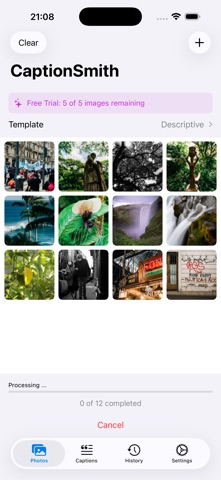
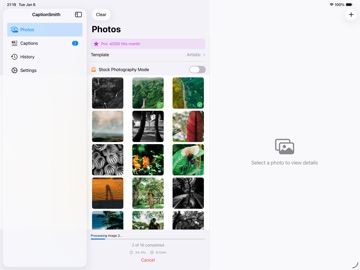
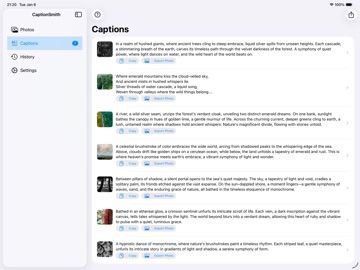
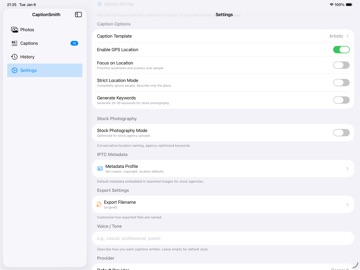
CaptionSmith turns the tedious work of captioning and keywording into a few taps. Point it at your photos, pick a style, and let AI write professional titles, descriptions, and keywords — then embed them straight into your image metadata, ready for stock agencies or your own searchable library. Built for stock photographers, and just as handy for everyday photos. WHAT IT DOES • AI captions & keywords — Claude, OpenAI (GPT), and Google Gemini analyze each photo and write accurate, natural descriptions plus 20–45 relevant keywords. • Stock Photography Mode — agency presets for Shutterstock, Adobe Stock, and Getty/iStock with the right keyword counts, title lengths, and editorial formatting. • Compare providers (new) — run one photo through Claude, GPT, and Gemini side by side and keep the caption and keywords you like best. • 13 caption templates — Descriptive, Concise, Stock Commercial, Stock Editorial, Product, Real Estate, Food, Travel, Portrait, Event, Artistic, Social, and a new Family & Everyday style. • People tagging — tag friends and family so their names appear in captions; on-device face detection helps you tag faster (no facial recognition, nothing stored). • Batch processing — caption 100+ photos at once with live progress. Minutes instead of hours. • Metadata embedding — writes to EXIF, IPTC, and XMP so captions are searchable everywhere and upload-ready; XMP sidecars for RAW/DNG. • Compliance tools — agency compliance checks, one-tap auto-fix, and AI-content disclosure for editorial. • GPS-aware captions — optional location context pulled from your photos. • Export to Photos, share anywhere, or import photos straight from other apps. TWO WAYS TO USE IT • Subscription — no API key required, with a free trial so you can try before you subscribe. • Bring your own key — power users can plug in their own Anthropic, OpenAI, or Google key. SUPPORTED PHOTOS JPEG, HEIC, PNG, and RAW/DNG (via XMP sidecar). PERFECT FOR • Stock contributors uploading to Shutterstock, Adobe Stock, Getty, and iStock. • Photographers who need consistent, agency-ready metadata in bulk. • Anyone building a searchable, well-captioned photo library. PRIVACY • Photos are sent only to the AI provider that captions them. • On-device face detection is used only to help you tag — there is no facial recognition, and no face data is ever stored or shared. • API keys are stored securely in the iOS Keychain. Requires iOS 17 or later. Subscriptions auto-renew unless cancelled; manage them anytime in your Apple account settings. Terms of Use: https://www.apple.com/legal/internet-services/itunes/dev/stdeula/
Latest release
What’s New
SHARE THE PHOTO AND THE CAPTION — TOGETHER • One action sends both. The new "Share Photo + Caption" button on the photo details screen puts the picture in the attachment and your caption in the message body. Text it or mail it and the caption arrives as words your reader actually sees — while staying embedded in the file's metadata, where agencies and photo apps read it. FIXES • Local (Ollama) stays local. Choosing Local (Ollama) on a Mac could sync to your iPhone, which would then send the photo to our servers and spend a credit — on the one provider whose whole promise is that nothing leaves your machine. iPhone now refuses Mac-only providers no matter where the setting came from. • Errors you can actually read. A refusal that should have been a sentence showed a raw internal code instead. Messages from our servers now show their readable text, and a Settings row that did nothing has been removed. • Truthful agency CSVs. The Category column was filled with CaptionSmith's own category names in exports for agencies that expect their own codes. It now carries a category only in our generic format, and stays blank for agency formats until each one has a proper mapping. Built by an ICU doctor who shoots on the side. Tap Help & Support in Settings with any feedback.
Audience growth
Ratings growth
Baseline captured. Growth appears after the crawler observes a changed rating count.
Momentum comes from crawler snapshots for the tracked storefront. “Viral growth signal” means unusually fast recent rating gains; it is an indicator, not download data.
Price tracking
Price intelligence
First snapshot captured. The trend line starts after the next crawler price observation.
- First observed Aug 1, 2026 · 1:30 PM Free
Screenshots