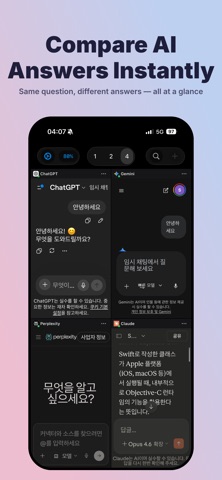
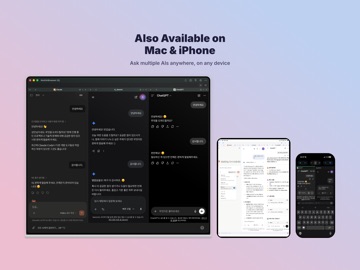
About this app
MultiAIBrowser - Compare AI Services Side-by-Side, Your Way Pick your favorite AI services — ChatGPT, Claude, Gemini, Grok, Perplexity, Copilot, and more — and ask them all at once with the Unified Search Bar. MultiAIBrowser is a productivity app that gives you instant access to multiple AI services on your iPad and iPhone. KEY FEATURES (FREE) • Unified Search Bar: Send one query to all your selected AI services at once • Side-by-Side Panels: Up to 2 AI services on iPad, up to 4 on iPhone • Edit Freely: Add, remove, reorder, and swap AI services to fit your workflow • Optimized for iPad: Designed for the iPad's large display • External Keyboard Support: Cmd+Return to submit, Cmd+T/W for tab management, and more shortcuts • Lightweight & Fast: Minimal system resources, maximum productivity PRO FEATURES (One-Time Purchase) • Up to 10 Side-by-Side Panels (iPad): Compare more AI services at the same time • Ad-Free Experience (iPhone): Remove ads on iPhone for a cleaner workspace • One purchase for all your Macs, iPads, and iPhones • One-time purchase — not a subscription HOW TO USE 1. Launch MultiAIBrowser on your iPad or iPhone 2. Type your question in the Unified Search Bar 3. Tap Send (or Cmd+Return) to send to all AI services simultaneously 4. Switch between panels to compare each AI's response Perfect for quick searches, translations, code reviews, idea comparisons, and getting multiple AI perspectives at once. Compare answers from multiple AIs with MultiAIBrowser and find the best results.
Latest release
What’s New
- Fixed the '+' attachment menu not appearing in Gemini. - Stability and performance improvements.
Audience growth
Ratings growth
Baseline captured. Growth appears after the crawler observes a changed rating count.
Momentum comes from crawler snapshots for the tracked storefront. “Viral growth signal” means unusually fast recent rating gains; it is an indicator, not download data.
Price tracking
Price intelligence
First snapshot captured. The trend line starts after the next crawler price observation.
- First observed Aug 1, 2026 · 1:31 PM Free
Screenshots