About this app
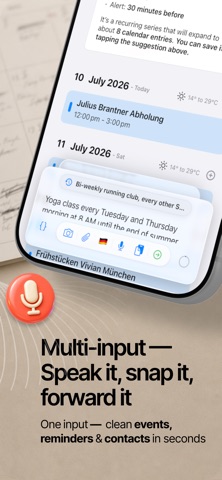
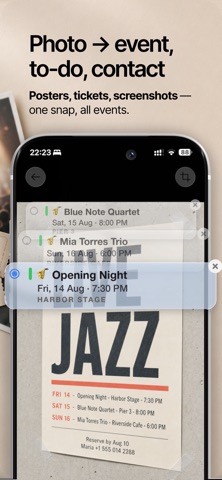
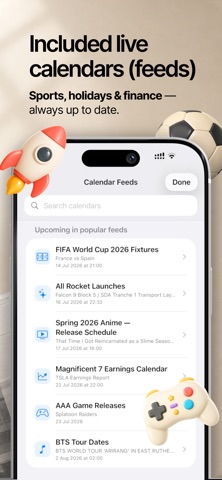
Calendars AI Scheduler is your all-in-one planner for events, reminders, tasks, and contacts. The full calendar is free to use — and an AI assistant turns anything you speak, snap, paste, upload, or share into your schedule in seconds. ■ THE CALENDAR — ALL CORE FEATURES FREE A clean, modern planner with everything you need, no subscription required: - Full Calendar Experience: Day, Agenda and Month views with drag-and-drop editing, color-coded calendars, and live weather. - Works with Your Existing Calendars: Apple Calendar, Google Calendar, and Microsoft Outlook. - Powerful Reminders & Repeats: Recurring plans, multiple reminders, prep alerts, and custom schedules without the usual hassle. - NEW — 600+ Free Calendar Feeds: Subscribe to holidays, sports teams, TV shows, and more with one tap. - Apple Watch & Widgets: Create and manage events on the go, with fast access across your devices. - Easy Sharing: Share events as .ics files or quick links. - Event Attachments: Add files to events via iCloud so your plans stay organized in one place. (Subscription required) ■ THE AI ASSISTANT — YOUR SCHEDULING COPILOT Stop typing everything in by hand. Speak, snap, paste, upload, or share — AI turns it into structured events, reminders, tasks, and contacts: - Talk Naturally: Create, edit, move, and organize events and reminders as if you were chatting with a personal assistant. - Capture from Anywhere: Turn voice, photos, screenshots, posters, PDFs, emails, notes, and web pages into organized calendar entries fast. - Image, PDF, Excel & Spreadsheet Support: Upload schedules, rosters, and plans as spreadsheet files and watch them become events. - Mention Anything with @: Reference an exact calendar, list, event, reminder, or contact right in your prompt. Drag events and reminders straight into the prompt to edit or build on them. - Smart Detection: AI picks up dates, times, locations, attendees, links, and codes automatically — in multiple languages. - Batch Creation: Brain-dump multiple plans in one prompt, and AI turns them into separate events and reminders. - Agentic AI Assistance: Spot conflicts, get suggestions, and let AI look up live event information for smarter planning. - Contacts in Seconds: Create Apple Contacts from business cards, email signatures, or copied text. ■ TRY ASKING - "Create dinner with Max Mustermann on Friday at 7 PM, invite him, and remind me to book a table by noon." - "Move tomorrow's standup from 9:30 to 10:00, invite Ana, and add a 15-minute prep reminder." - "Yoga Tue and Thu 7 PM for the next 4 weeks, and remind me to pack my mat an hour before each session." - "Add the next Lakers home game, remind me to buy snacks 2 hours before tipoff, and send Max the invite." - "Show me this week's conflicts and suggest 3 ways to fix them." - Snap a concert poster, forward a travel confirmation, or upload a PDF or spreadsheet schedule — the events appear in your calendar. ■ WHAT'S FREE, WHAT'S NOT — SIMPLE Every core calendar feature is free: full calendar, reminders, 600+ feeds, widgets, Apple Watch, sharing, and sync with Apple, Google, and Outlook. AI features include a limited free allowance every month — a subscription unlocks unlimited AI usage and event attachments, with a 3-day free trial. Perfect for busy professionals, students, families, travelers, and anyone who wants less scheduling admin and more control. Available for iPhone, iPad, macOS, and Apple Watch. Privacy Policy: https://www.smartcalendars.ai/en/privacy Terms of Service: https://www.smartcalendars.ai/en/terms
Latest release
What’s New
[NEW] Prioritize the calendar panel over AI input in Settings. [DEPRECATED] QR codes and expiring share links have been removed. Bug Fixes and Improvements.
Audience growth
Ratings growth
Baseline captured. Growth appears after the crawler observes a changed rating count.
Momentum comes from crawler snapshots for the tracked storefront. “Viral growth signal” means unusually fast recent rating gains; it is an indicator, not download data.
Price tracking
Price intelligence
First snapshot captured. The trend line starts after the next crawler price observation.
- First observed Aug 3, 2026 · 7:37 PM Free
Screenshots