About this app
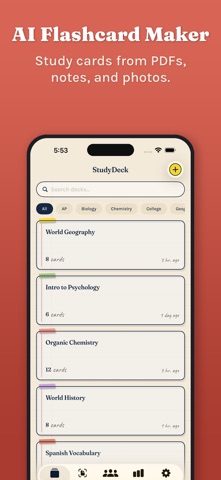
Turn any notes, PDFs, or photos into AI-powered flashcards in seconds. StudyDeck uses artificial intelligence to generate study cards automatically, so you spend less time creating and more time learning. SMART FLASHCARD CREATION - Paste text, import a PDF, or snap a photo - AI does the rest - Camera OCR scans handwritten or printed notes instantly - AI generates front/back cards, multiple choice questions, and true/false statements - Edit, customize, and organize cards into decks 7 STUDY MODES - Flashcards - classic swipe-to-study with flip animations - Multiple Choice - AI-generated answer options test real understanding - True/False - quick-fire statements to reinforce key facts - Written Response - type your answer and get AI-evaluated feedback - Audio Quiz - speak your answers and study hands-free on iPhone - Spaced Repetition - the FSRS algorithm schedules reviews at the optimal time - Practice Tests - timed mixed-format tests to simulate the real thing LEARN SMARTER WITH SPACED REPETITION StudyDeck uses FSRS v5, the most accurate spaced repetition algorithm available. It tracks what you know and what you don't, scheduling reviews right before you'd forget. No more wasting time on cards you've already mastered. AI THAT WORKS ON YOUR DEVICE StudyDeck uses Apple Intelligence for fast, private AI processing right on your iPhone. AI generation and speech recognition run on-device where supported, so your study materials stay private. BUILT FOR STUDENTS - Track your study progress with detailed analytics - See accuracy, mastered cards, and study streaks - Share decks with classmates - Dark mode and haptic feedback throughout - No ads FREE TO START Study with all 7 modes for free - up to 3 decks and 100 flashcards. Free accounts also include limited AI generation and import credits each month. Upgrade to Premium for unlimited access to everything. StudyDeck Premium: - Annual subscription with 7-day free trial - Lifetime access - one-time purchase - Unlimited decks and flashcards - Unlimited AI card generation - Unlimited PDF and photo imports - Unlimited practice tests and study guides - Free version: 3 decks, 100 flashcards, 5 AI generations, 5 PDF imports, 5 photo imports, 3 practice tests, and 3 study guides per month Privacy: StudyDeck processes everything on your device. On-device AI means your notes stay private. See our privacy policy for details. Privacy Policy: https://studydeck.net/privacy.html Terms of Use: https://studydeck.net/terms.html Questions? Visit our support page at https://studydeck.net/support.html
Latest release
What’s New
Mac support improvements and stability fixes. Safari extension now has a right-click "Send to StudyDeck" option. Scanned PDFs are auto-recognized and processed. Flashcards now generate in your language. Crash fixes.
Audience growth
Ratings growth
Baseline captured. Growth appears after the crawler observes a changed rating count.
Momentum comes from crawler snapshots for the tracked storefront. “Viral growth signal” means unusually fast recent rating gains; it is an indicator, not download data.
Price tracking
Price intelligence
First snapshot captured. The trend line starts after the next crawler price observation.
- First observed Aug 1, 2026 · 1:28 PM Free
Screenshots