About this app
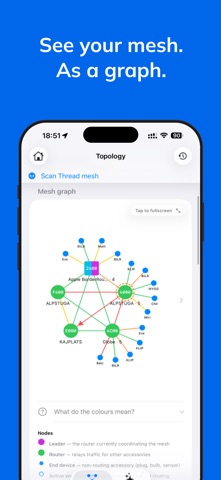
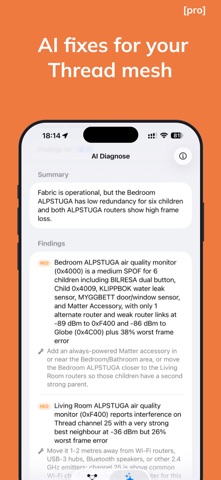
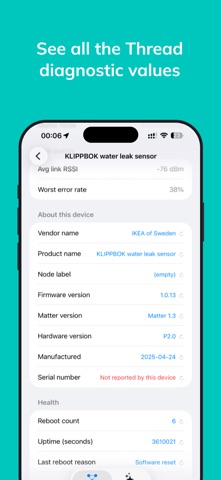
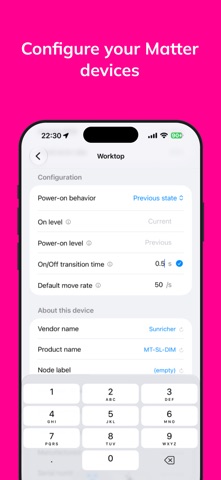
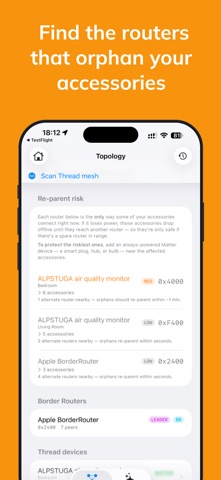
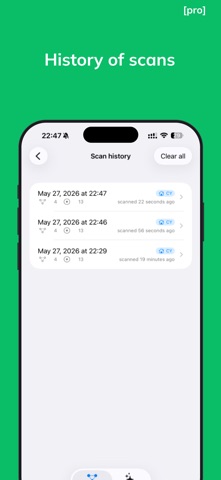
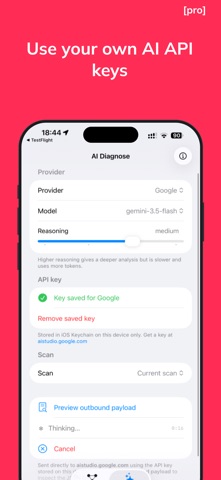
Thread Doctor maps and helps diagnose the Thread mesh used by your Matter accessories paired in the Home app. When devices go unresponsive, respond slowly, or keep dropping off the network, Thread Doctor helps you see what is happening: routers, end devices, Border Routers, signal quality, battery levels, and possible weak points in your mesh. It reads supported Matter and Thread diagnostic data directly from your paired accessories and lets you change supported Matter device settings. Changes happen only when you explicitly apply them. Available values and settings depend on each accessory, firmware version, and platform support. WHAT IT HELPS ANSWER • Why do my Matter accessories show “No Response”? • Which device may be a weak point in my Thread mesh? • Where should I add another Thread router? • Which battery-powered accessories need attention? • Why did my Matter clock lose the time after a power cut? FREE FEATURES • Mesh graph with routers, child devices, Border Routers, signal values, link quality, and router-child relationships. • Device details for supported Matter and Thread attributes, including RSSI, LQI, RLOC16, routes, neighbors, Leader Router ID, sleep behavior, battery level, error rate, uptime, and more. • Force Sync (time) — set a Matter accessory's clock; shows device time, drift, and time source. • Identify — ask an accessory to blink its light so you can physically find it. • Possible weak-point detection based on topology data available during the scan. • Thread Leader identification. • Battery monitoring and filtering. • Separate lists and detail cards for HomeKit-only accessories, Matter-over-Wi-Fi devices, and Thread devices that hide diagnostics. • Self-reported device faults — radio, network, and hardware faults read from each accessory's Matter General Diagnostics cluster. • Matter device configuration — change supported settings such as power-on behavior, transition times, sensor delays, thermostat controls, and more. PRO FEATURES • AI Diagnose Use your own third-party LLM API key to analyze a structured mesh snapshot. Preview the outbound payload before sending; analysis starts only when you tap Analyze. • Scan history Browse past scans, compare snapshots, and review previous network states. • Snapshot export Share the raw mesh as JSON for troubleshooting, research, social posts, or your own scripts. One-time unlock. No subscription. PRIVACY Thread Doctor is designed to work locally. • No backend, analytics, telemetry, accounts, or third-party SDKs. • Pro unlock is handled through the standard in-app purchase system. • Your LLM API key is stored only on-device in the system Keychain. • Matter diagnostics and configuration changes use native APIs. Settings change only when you explicitly apply them. • Optional AI Diagnose sends data only after you preview the payload and tap Analyze. REQUIREMENTS • iOS 18 or later • Matter accessories paired in the Home app • Wi-Fi connection to the same network as your Border Routers • Optional AI Diagnose requires your own third-party LLM API key NOT A WI-FI NETWORK SCANNER Thread Doctor does not scan Wi-Fi networks. It reads supported Matter and Thread diagnostic information from paired smart home accessories. Thread Doctor is an independent indie project. It is not affiliated with or endorsed by any platform provider, standards organization, or accessory manufacturer. Full data-flow documentation: https://threaddoctor.app/privacy Terms of Use: https://www.apple.com/legal/internet-services/itunes/dev/stdeula
Latest release
What’s New
• Search devices by name or RLOC. • Remove Border Routers discovered on other Thread networks (mention left). • Cleaner Structured graph. • Measured radio congestion replaces guessed interference (scan twice to see results). • Optional full JSON export with raw neighbour & route tables. • Custom name for unidentified routers. • Updated AI model picker. • Fix diagnostics share. • Various fixes and UI improvements.
Audience growth
Ratings growth
Momentum comes from crawler snapshots for the tracked storefront. “Viral growth signal” means unusually fast recent rating gains; it is an indicator, not download data.
Price tracking
Price intelligence
- First observed Aug 3, 2026 · 7:37 PM Free
Screenshots