About this app
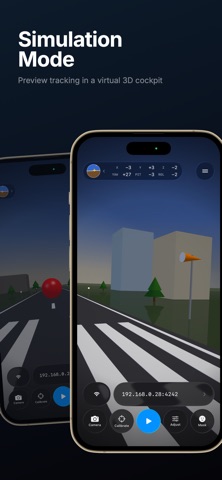
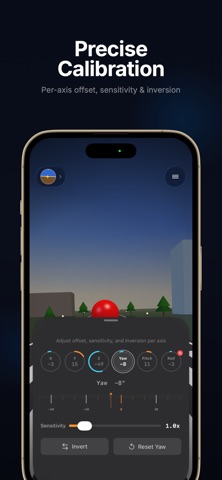
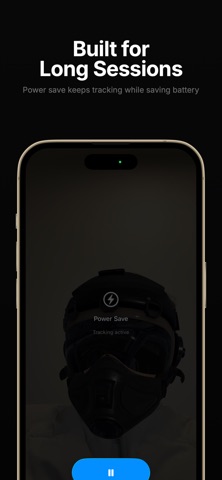
Smart Head Track — Head Tracking for PC Games, No Hardware Needed Turn your iPhone or iPad into a head tracker. Move your head to control your in-game camera in flight sims, racing games, truck simulators, and more — replacing expensive hardware like TrackIR with your phone's front camera and ARKit. WORKS WITH YOUR FAVORITE GAMES Compatible with any PC game supporting FreeTrack or TrackIR protocol: • Microsoft Flight Simulator • Digital Combat Simulator (DCS) • Euro Truck Simulator 2 / American Truck Simulator • IL-2 Sturmovik • Star Citizen • Assetto Corsa • …and hundreds more EASY SETUP Connect to OpenTrack (free, open-source) on your PC via WiFi or USB. Enter your PC's IP address, tap Calibrate, and start tracking in under a minute. On Your PC: 1. Download and install OpenTrack: https://git.io/JUs2U 2. Set Input to "UDP over network" 3. Set Output to "freetrack 2.0 Enhanced" 4. Ensure port 4242 is open on your firewall On Your Phone: 1. Launch Smart Head Track and enter your PC's IP address 2. Align your face and tap Calibrate 3. Press Start on both the app and OpenTrack PRECISE CALIBRATION Adjust each of the 6 axes (X, Y, Z, Yaw, Pitch, Roll) independently. Per-axis sensitivity, inversion, and offset controls let you dial in exactly the feel you want. SIMULATION MODE Preview your tracking in a virtual 3D cockpit before connecting to your PC — perfect for testing your calibration settings. BUILT FOR LONG SESSIONS • Power Save — Dim the camera view, hide overlays, or switch to minimal UI while tracking continues • Connection Monitor — Get notified if the link to OpenTrack drops so you can troubleshoot quickly AR FACE OVERLAYS Pilot helmets, sunglasses, combat gear, and more — add fun overlays to your camera feed while tracking. FREE & PRO The core tracking experience is free with a daily time limit. Unlock unlimited tracking and all face overlays with a one-time Pro purchase. CONNECTIVITY • WiFi: UDP over your local network (default port 4242) • USB: Direct cable connection via companion desktop app • iPad: Full landscape orientation support Privacy Policy: https://www.tinacinc.com/SmartHeadTrack/privacy_policy.html
Latest release
What’s New
• Bug fixes and stability improvements
Audience growth
Ratings growth
Baseline captured. Growth appears after the crawler observes a changed rating count.
Momentum comes from crawler snapshots for the tracked storefront. “Viral growth signal” means unusually fast recent rating gains; it is an indicator, not download data.
Price tracking
Price intelligence
First snapshot captured. The trend line starts after the next crawler price observation.
- First observed Aug 19, 2026 · 2:59 PM Free
Screenshots