About this app
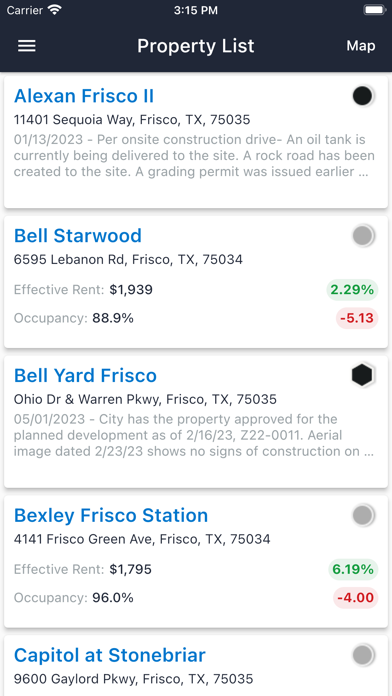
The Market Analytics Mobile App allows access to the apartment industry’s most accurate information on your mobile device anytime, anywhere. Whether you are in operations, development, acquisitions, financing or provide other services to the industry, the Market Analytics Mobile App will help support smarter business decisions – on the fly. Are you planning to acquire an apartment or student housing property? Do you already have a multifamily portfolio? How do your properties stack up against the competition? Get instant benchmarks of your properties and their competitors, such as: rent and occupancy growth rates, effective rent level, effective rent per square foot, occupancy rate, number of units, asset class, property status, and more. Users can also dive deeper into the data and see the full unit mix of floor plans, along with the number of units in each floor plan, square footage, and granular effective rent level. This is the Market Analytics’ standard. If you want to look at properties that are planned or under construction, Market Analytics specializes in monitoring the construction pipeline across the nation , and provides unprecedented details about conditions that could impact properties delivery to market. Use the Market Analytics Mobile App to make smarter, more confident apartment and student housing decisions. Features: Access Market Analytics’ apartment data down to the floor plan level, which includes: list of all floor plans, number of units in each floor plan (unit mix), number of beds and baths, current effective rent level, and size of the units. View property-level details such as average effective rent per unit, effective rent per square foot, occupancy rate, number of units, asset class, property status, ORA Score (by J Turner Research), Walk Score(tm) and more. Search for assets based on property name, city, zip code, metro area, university name, or current location. Interactive mapping capability allows for quick previews of apartment performance, including competitive benchmarks. Zoom into a neighborhood, or view properties across the entire metro. Do you want to see all the properties under construction in the entire metro or close to a university? Would you like to sort existing properties by highest rent level or lowest rent growth? The List View shows the summary for every property on the map, with the added ability to sort based on performance metrics. Filter for properties based on status – Pre-Planned, Planned, Under Construction, Lease Up, or Stabilized. Add other filter criteria such as year built. Ideal for all company types and roles related to multifamily: Company Types – Developers, Owners, Investors, Management Companies, Lenders, Brokers, Vendors, Consultants, Universities, Other Public Sectors Role Types – C-Level, Acquisitions, Dispositions, Asset Management, Development, Property Management, Analysts, Investor Relations
Latest release
What’s New
Regular maintenance and a few minor enhancements.
Audience growth
Ratings growth
Baseline captured. Growth appears after the crawler observes a changed rating count.
Momentum comes from crawler snapshots for the tracked storefront. “Viral growth signal” means unusually fast recent rating gains; it is an indicator, not download data.
Price tracking
Price intelligence
First snapshot captured. The trend line starts after the next crawler price observation.
- First observed Aug 15, 2026 · 9:18 PM Free
Screenshots