About this app
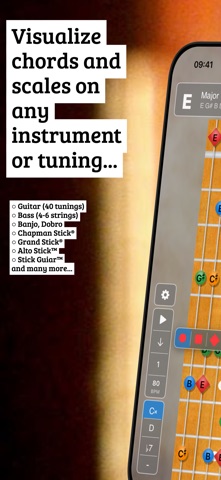
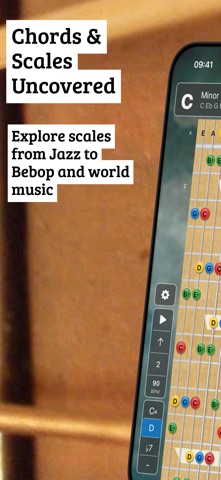
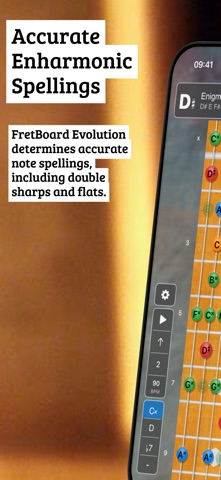
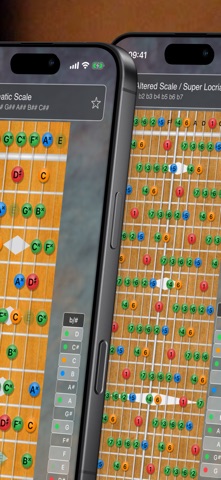
Discover FretBoard Evolution: The Ultimate Reference Tool for String Instrument Master Unlock the secrets of your stringed instrument with FretBoard, the comprehensive reference app designed for musicians of all levels. Whether you're a beginner seeking to understand music theory or a seasoned player looking to expand your repertoire, FretBoard is your go-to guide for chords, scales, and tunings. Major Features: - Extensive Tuning Library: Over 150 pre-made tunings across 15 instrument groups, including Guitar, Bass, Violin, Mandolin, Ukulele, Chapman Stick and many more. - Chords & Scales: Visualize 68 chords and 83 scales in every key. Expand your musical language and find the perfect harmony for your compositions. - Customize Your Scales: Tap any note to mute it or add custom notes outside the scale. Long-press to change note shapes (circle, square, diamond, cross, triangles) - shapes follow scale degrees, so your visual markers stay consistent when transposing. - Sound Banks & Playback: Listen to scales and chords with the included sound bank. Control tempo with a slider, tap tempo, or pick from musical presets like Largo, Allegro, and Presto. - Custom Instruments: Tailor the app to your needs with the instrument editor. Modify tunings, change the visual aesthetics, and even create new instruments. - Personalization: Choose from various woods, strings, and inlays to customize the look of each instrument to your preference. - Clean Practice Mode: Tap the fretboard to hide the controls for an unobstructed view — perfect for focused practice or teaching. Planned Features: - Add custom scales and chords. - Discover matching scales or chords for specific notes with the "Identify" feature. Who is FretBoard Evolution for? FretBoard Evolution is for every string instrument player who wants to deepen their understanding of their instrument. It's for the curious beginner, the teaching professional, and the performing artist. It's for the musician who never stops learning and for the teacher who always has more to give. How can FretBoard be used? - Learning Tool: Quickly look up chords and scales, and see how they're played on your instrument. - Songwriting Aid: Experiment with different tunings and sounds to find the perfect mood for your music. - Practice Companion: Use the app to practice scales and chords, improving your muscle memory and theoretical knowledge. With FretBoard Evolution, you're not just playing music; you're understanding it. Download now and step into a world where your fretboard becomes a canvas for musical exploration. FretBoard Evolution is free to explore with major and minor scales and chords. Want the full library? Try all premium features free for 7 days, then choose a yearly subscription or grab the lifetime unlock - because some of us still believe in "pay once, own forever." FretBoard Evolution is developed by just a one-person team. A 5-star review goes a long way in supporting indie developers. If you like the app, please consider leaving a nice review. If you find a bug, have issues or requests, please contact info@asv.pt Privacy Policy: https://asv.pt/earthbeat-privacy-policy/ Terms of Use: https://www.apple.com/legal/internet-services/itunes/dev/stdeula/
Latest release
What’s New
Changes: - Added tap-to-toggle notes: tap directly on the fretboard or on the dot area in the MagicNoteBar to customize scales and chords - Tap a scale note to mute it (appears translucent) - Tap an empty position to add a custom note (appears in purple) - Custom modifications affect both the visual display and audio playback - Reintroduced note shape customization from Classic FretBoard: long-press any note dot to change its shape - Choose from circle, square, diamond, cross (X), or triangle (up/down) shapes - Shapes are tied to scale degrees - when you change the root note, shapes follow their intervals - Shapes reset when selecting a different scale or chord - New "Shape of Root Note" setting in Appearance to set a default shape for all root notes - Redesigned settings and selection screens with new "Studio Glass" design system for improved usability and readability - Added tempo selection dialog with slider, tap tempo, and musical presets (Largo, Adagio, etc.) - BPM button now displays current tempo value - Reintroduced tap-to-hide HUD: tap anywhere on the fretboard to hide the bottom controls for an unobstructed view (a classic feature from the pre-Fretboard Evolution era) - Added User Guide in Settings explaining key features, note colors, playback controls, and gestures - Minimum iOS version changed from iOS 12 to iOS 16 Notes: This version is a native SwiftUI port of the original Flutter application. The iOS 16 requirement enables the use of modern SwiftUI features including Canvas-based rendering for improved fretboard visualization.
Audience growth
Ratings growth
Baseline captured. Growth appears after the crawler observes a changed rating count.
Momentum comes from crawler snapshots for the tracked storefront. “Viral growth signal” means unusually fast recent rating gains; it is an indicator, not download data.
Price tracking
Price intelligence
First snapshot captured. The trend line starts after the next crawler price observation.
- First observed Aug 10, 2026 · 6:02 PM Free
Screenshots