About this app
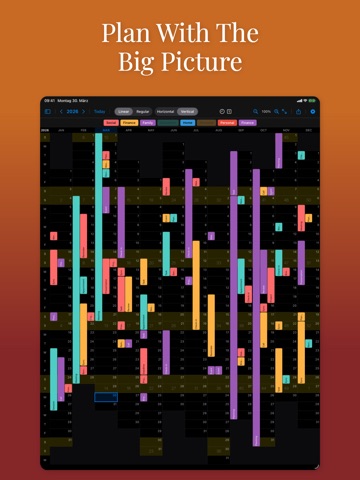
Zoom Out. See the Bigger Picture. Lineár shows your whole year in a single view: all 365 days at once. Spot busy stretches, find free time, and see how everything fits without flipping through months. Events appear as coloured bars across the days they span. Tap any one for the details. Four Ways to See Your Year Horizontal (months as rows) or vertical (months as columns, like a wall planner), each with two day arrangements: - Linear: days align by weekday, so overloaded days stand out. - Regular: days align by date (1–31), every month's 1st in the same column. Edit Right on Your Calendar (New in 2.0) Create, edit, and delete events without leaving Lineár: times, locations, notes, reminders, and full repeating events. Your first 10 edits are free. Lineár Pro then unlocks unlimited editing as a one-time purchase, no subscription. Viewing always stays free. Make It Yours Works with iCloud, Google, Exchange, and subscribed calendars in their own colours. Show, hide, and reorder calendars with a tap. Customise colours, fonts, and layout, pin the header or left column while scrolling, and filter events for a cleaner view. Export to PDF or print on Mac. Features - Whole year in one view, horizontal or vertical - Linear (weekday) and Regular (date) modes - Coloured event bars, filters, and custom colours - Create, edit, and delete events, repeats included (Lineár Pro) - Sticky header and left column - PDF export and printing (macOS) - iCloud, Google, Exchange, and subscribed calendars - Dark mode
Latest release
What’s New
- Fixed Lineár showing no calendars at all when calendar access had been declined. Lineár now explains what is missing and takes you straight to the right setting - Deleting and reinstalling did not bring the access question back, because the system remembers your answer. You can now allow access from inside Lineár - Clearer message when none of your calendars can be edited, for example when you only have subscribed calendars such as holidays, which are always read-only - Fixed events on 31 December never showing up. The last day of the year now displays its events like every other day
Audience growth
Ratings growth
Baseline captured. Growth appears after the crawler observes a changed rating count.
Momentum comes from crawler snapshots for the tracked storefront. “Viral growth signal” means unusually fast recent rating gains; it is an indicator, not download data.
Price tracking
Price intelligence
First snapshot captured. The trend line starts after the next crawler price observation.
- First observed Aug 10, 2026 · 6:02 PM Free
Screenshots