About this app
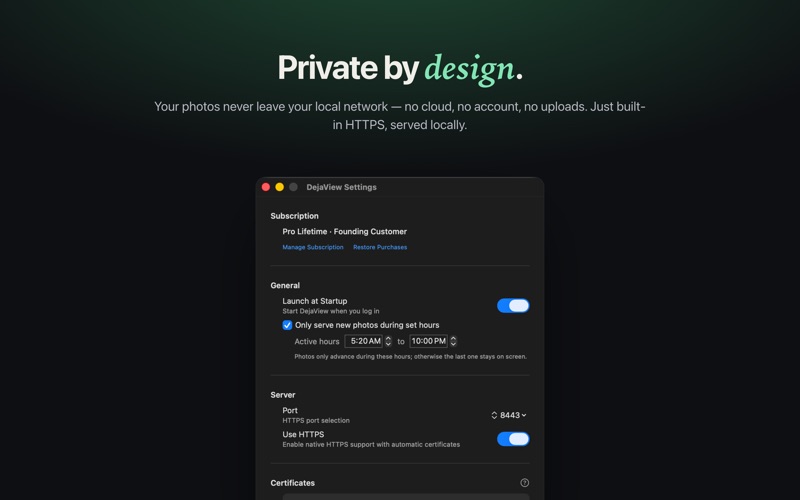
Your Photos. Your DAKboard. No Cloud. Stream albums from your Photos library, or any hard drive folder, directly to DAKboard, MagicMirror, Home Assistant, or any display that can load images from a URL. Your photos never leave your local network. WHY DO I NEED THIS APP DAKboard makes beautiful wall displays, but getting your personal photos onto them usually means uploading to cloud services. Your family memories shouldn't need to be exposed to the internet just to display them in your own home. DejaView solves this. It runs quietly in your menu bar, serving photos directly to your displays over your local network. Private. Local. Secure. KEY FEATURES - Photo Library Streams: Stream one or more albums as a single stream — including smart and shared albums — with proportional weighting across albums. - Folder Streams: Turn one or more folders on your Mac (including external or network drives) into a local-network photo stream. - Smart Rotation: Intelligent LRU selection ensures variety without repetition. - Flexible Ordering: Choose chronological or randomized display. - Optimized Delivery: Configurable sizes from 800px to original resolution. - Built-in HTTPS: Secure connections with automatic certificate generation. - Read-Only Access: Your originals are never modified. - Menu Bar App: Lightweight, unobtrusive, always ready. HOW IT WORKS 1. Launch DejaView and grant read-only access to your Photos library (if using Photos integration) 2. Select which albums or folders to stream 3. Add the generated URLs to your DAKboard Photo URL blocks 4. Done. Your photos appear on your displays. BUILT FROM PERSONAL NEED I created DejaView because I wanted my family photos on my DAKboard, but discovered that sharing albums often meant making them publicly accessible online. That didn't sit right with me. So I built DejaView: keep photos private and local while making them available to any display on my network. If you value your privacy as much as I do, DejaView is for you. REQUIREMENTS - macOS 15.0 or later - Mac must be running to serve photos - Displays must be on the same local network SUBSCRIPTIONS Subscriptions auto-renew unless turned off at least 24 hours before the end of the current period. You can manage or cancel your subscription in your App Store account settings. Terms of Use (EULA): https://www.apple.com/legal/internet-services/itunes/dev/stdeula/ Privacy Policy: https://dejaview.photos/privacy Transform your DAKboard into a window to your memories.
Latest release
What’s New
■ New: - Meet DejaViewer, the free iPhone & iPad companion. Scan the QR code in DejaView's menu bar and every stream your Mac serves is in your pocket — photos, folders, and the family Health board. With App Clip support, pairing works the moment you scan, before the app is even installed. - Family Health on your board: family iPhones can share Activity rings, sleep, steps, and heart-rate variability to health cards you design in DejaView. - Health history import: on first enable, bring in your full Apple Health history so trends and long-term cards start with real data. ■ Improvements & Fixes - A disconnected external drive no longer freezes launch or stops serving. Streams on other drives keep working, the menu names the exact drive to reconnect, and everything resumes automatically when it's back. - Fixed a rare crash that could stop the server after a long stretch of continuous serving. - Rotated photos in folder streams now always serve upright at Original size. - Configure: albums in the sidebar now highlight when selected, with a visible + button for adding them to streams.
Audience growth
Ratings growth
Baseline captured. Growth appears after the crawler observes a changed rating count.
Momentum comes from crawler snapshots for the tracked storefront. “Viral growth signal” means unusually fast recent rating gains; it is an indicator, not download data.
Price tracking
Price intelligence
First snapshot captured. The trend line starts after the next crawler price observation.
- First observed Aug 11, 2026 · 1:08 AM Free
Screenshots