About this app
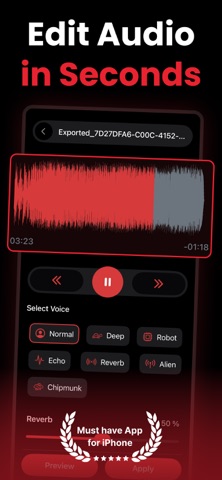
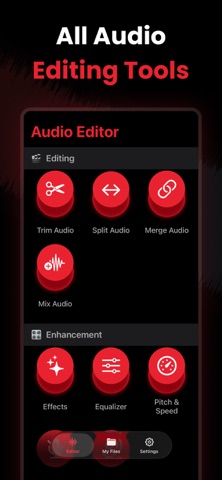
Audio Editor – Enhance, Edit & Transform Your Sound Meet Audio Editor, the all-in-one sound editing studio designed for creators, musicians, podcasters, and anyone who loves perfect audio. Edit, enhance, convert, and create—right from your iPhone or iPad. Whether you’re cleaning up a voice recording, boosting music volume, mixing tracks, trimming clips, or applying effects, Audio Editor gives you professional tools in one simple, powerful app. KEY FEATURES Sound Enhancer & Amplifier - Boost volume, increase clarity, and make your audio sound crisp and powerful. Trim, Cut, Split & Merge - Edit any audio file with precision. Combine clips, split sections, or remove unwanted parts. Mix Multiple Audio Tracks - Layer music, sound effects, and voice recordings to create studio-quality mixes. Recorder (High Quality) - Record crystal-clear audio directly in the app and start editing instantly. Equalizer (EQ) - Fine-tune frequencies with professional EQ presets or customize your own. Audio Effects - Reverb, echo, distortion, fade-in/out, and more—transform your sound instantly. Pitch & Speed Control - Change pitch, speed up slow audio, or create fun voice variations. Noise Reduction - Remove background noise and enhance voice clarity in a single tap. Voice Changer - Convert your voice to multiple fun and creative characters. Audio to Text (Transcription) - Convert speech to accurate, editable text—perfect for notes, meetings, and podcasts. Text to Speech - Turn written text into natural-sounding audio in various voices. Format Converter - Convert audio between MP3, WAV, M4A, AAC, FLAC, and more. WHY USERS LOVE IT - Easy for beginners, powerful for pros - Fast processing and high-quality output - Clean, modern, intuitive interface - Works with all major audio formats - Perfect for editing music, reels, podcast clips, and voiceovers USE CASES - Improve music tracks - Edit podcast episodes - Clean up voice memos - Create ringtones - Make voice-over content - Fix low-volume audio - Transcribe meetings - Convert files for any platform PRO Version: Unlock the full potential of our app with premium version. Payment will be charged to your iTunes account at confirmation of purchase. Subscriptions automatically renew unless auto-renew is turned off 24-hours before the end of the current period. Accounts will be charged for renewal within 24 hours of the end of the current period, and a renewal fee will be provided. The unused portion of a free trial period, if offered, will be forfeited when the user purchases a subscription to that product. Please note that a subscription or one-time lifetime purchase is required for the complete functionality of the app. Privacy: https://sites.google.com/view/kttechapps-privacy/home Terms: https://sites.google.com/view/kttechapps-terms/home Your audio. Your rules. Download Audio Editor today and unlock the easiest way to edit, enhance & transform your sound.
Audience growth
Ratings growth
Momentum comes from crawler snapshots for the tracked storefront. “Viral growth signal” means unusually fast recent rating gains; it is an indicator, not download data.
Price tracking
Price intelligence
- First observed Aug 6, 2026 · 5:14 AM Free
Screenshots