About this app
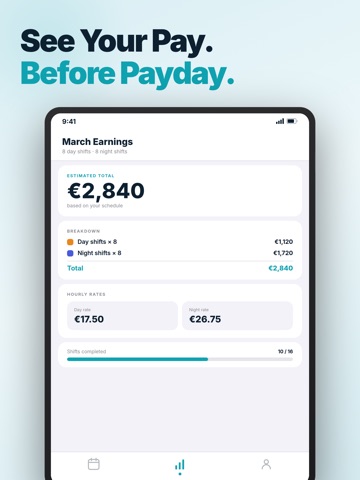
Plan every shift in seconds — no manual input, no missed days. Shift Calendar is built for people who work rotating schedules: nurses, firefighters, paramedics, drivers, factory workers, and anyone on a non-standard rota. Set your shift pattern once, and the app fills your entire calendar automatically — months in advance. KEY FEATURES Auto-Pattern Scheduling Choose from built-in patterns (2/2, 3/3, 4/4, continental, Panama, Pitman) or create your own custom rotation. Set the start date, and your schedule populates instantly — no re-entering shifts every week. Earnings Tracker Enter your hourly rate once. Shift Calendar automatically calculates how much you'll earn this week, this month, or per shift. See your projected pay before payday — no spreadsheet needed. Home Screen Widget See today's shift and tomorrow's at a glance without opening the app. The widget updates automatically when your pattern rolls over. Supports both small and medium widget sizes. Dark Mode — Properly Done Full Dark Mode support that follows your system setting or can be pinned manually. Every screen, every colour — designed for readability on night shifts when screen brightness matters. Calendar Sync Export shifts to Apple Calendar or view your rota alongside personal events. Your schedule stays in one place. BUILT FOR YOUR PROFESSION - Nurses & healthcare workers — 12-hour shifts, night rotations, on-call blocks - Firefighters & EMS — 24/48, Kelly schedule, 2-on/4-off - Drivers & logistics — continental shifts, variable start times - Factory & manufacturing — Panama, Pitman, rotating 3-team patterns Try free for 3 days. Weekly and annual plans available. Support: hello@britetodo.com Terms of Use (EULA): https://www.apple.com/legal/internet-services/itunes/dev/stdeula/ Privacy Policy: https://britetodo.com/legal/PrivacyPolicyBrite.pdf
Latest release
What’s New
Know your pay before payday. • Earnings Calculator — set your hourly rate and see estimated monthly pay, including overtime • 7 languages — Spanish, German, French, Portuguese, Polish, Turkish and Russian • Export shifts to Apple Calendar in one tap • Bug fixes and performance improvements
Audience growth
Ratings growth
Momentum comes from crawler snapshots for the tracked storefront. “Viral growth signal” means unusually fast recent rating gains; it is an indicator, not download data.
Price tracking
Price intelligence
- First observed Aug 10, 2026 · 6:10 AM Free
Screenshots