About this app
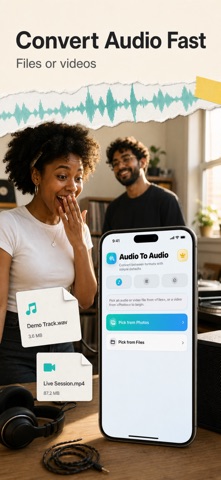
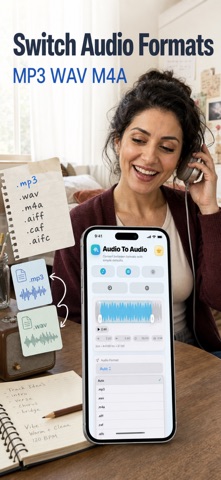
Convert compatible audio files or extract sound from video, trim the result on a waveform, and export it in the format you need. MP3 WAV M4A Audio Converter gives you a focused audio workflow on iPhone without the complexity of a multitrack editor. Choose an audio or video file from Files, or select a video from Photos, and the app inspects the source before showing the export choices that are actually available. You can see the source duration, file size, sample rate, and channel count before making changes. TRIM WITH A WAVEFORM Use the waveform to find the part you want. Set a custom start and end point, preview from any position, and keep the complete source whenever no trim is needed. Clear time controls make it easy to prepare a short voice memo excerpt, a section of a lecture, a music clip, or audio taken from a personal video. EXPORT A COMPATIBLE FORMAT Choose Auto or select an available MP3, WAV, M4A, CAF, or AIFF option. Formats are shown only when the selected source and Apple's AVFoundation export path support them, so the exact list can vary from file to file. The app never promises a format that the current source cannot produce. Auto selects a compatible choice for a quick result. EXTRACT AUDIO FROM VIDEO Pick a video from Photos or open a local video from Files to work with its audio track. Trim the section you need, choose one of the compatible audio containers presented by the app, and create an audio-only result. This is useful for personal recordings, interview clips, class videos, voice segments, and other media you are permitted to use. FADES AND EXPORT CONTROLS Open Advanced Settings to add a fade in, a fade out, or both. You can also enable optimization for network use when that export path supports it. The app validates the selected range and format before processing, shows conversion progress, and lets you cancel an active job. PREVIEW, SHARE, OR SAVE When processing finishes, preview the exported audio inside the app. Review its duration and size, share it with the iOS share sheet, or save a copy to Files. The original source remains separate from the exported result, giving you a straightforward way to test a clip before sending or organizing it elsewhere. BUILT FOR REPEAT TASKS The three-step Source, Convert, and Result flow keeps routine work easy to follow. Recent trim and export settings can be remembered between sessions. The result screen keeps playback, Share, and Save to Files together. LOCAL, PRIVATE WORKFLOW Conversion uses Apple's media frameworks on your device. You do not need an account or sign-in to import a source, trim it, and export a result. Files remain under your control, and you decide when to share or save the finished audio. The interface is localized across supported languages and follows the same compact workflow in each locale. GOOD FOR EVERYDAY AUDIO JOBS Use the app to shorten a voice recording, isolate a useful passage, extract speech or music from your own video, add smooth edges with fades, or prepare a compatible audio file for another app. The app is intentionally focused: it does not claim noise removal, multitrack mixing, recording, metadata editing, or universal support for every media format. The free plan includes 1 conversion per day. A yearly auto-renewable subscription unlocks unlimited conversions. You can restore the subscription in the app. PREMIUM ACCESS: - The free plan includes 1 conversion per day. - A yearly auto-renewable subscription unlocks unlimited conversions. - Payment is charged to your Apple ID when the subscription is confirmed. - The subscription renews automatically each year unless canceled at least 24 hours before the end of the current period. - Manage or cancel the subscription in your App Store account settings. - You can restore the subscription from within the app. Terms of Use: https://www.apple.com/legal/internet-services/itunes/dev/stdeula/ Privacy: https://yumcut.com/mobile/privacy
Latest release
What’s New
This release replaces the lifetime offer with a yearly auto-renewable subscription at the same US price point. It keeps one free conversion per day, improves StoreKit purchase recovery, and refreshes the localized paywall and App Store presentation.
Audience growth
Ratings growth
Baseline captured. Growth appears after the crawler observes a changed rating count.
Momentum comes from crawler snapshots for the tracked storefront. “Viral growth signal” means unusually fast recent rating gains; it is an indicator, not download data.
Price tracking
Price intelligence
First snapshot captured. The trend line starts after the next crawler price observation.
- First observed Sep 2, 2026 · 7:47 AM Free
Screenshots