About this app
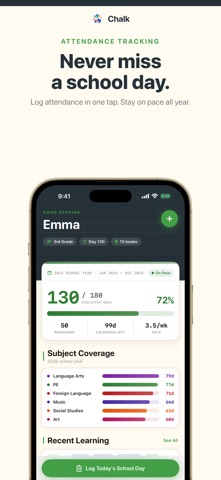
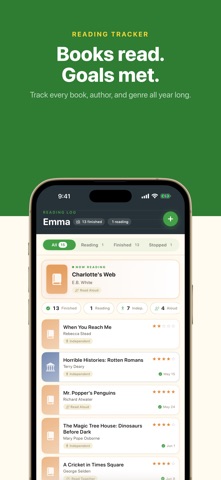
Chalk is the homeschool documentation app designed for families who want to capture learning as it happens - without paperwork, binders, or complicated spreadsheets. Whether you teach classical literature, follow Charlotte Mason nature study, unschool through hands-on exploration, or blend whatever works best for your child, Chalk gives you one calm, organized place to document it all. In about two minutes a day. TRACK ATTENDANCE WITHOUT STRESS Every state has different requirements for homeschool documentation. Chalk helps you stay on top of yours with a simple instruction day counter that shows exactly how many school days you have logged versus how many you need. The pace indicator updates automatically so you always know whether you are ahead of schedule, right on track, or need to pick up the pace before year-end. When the year ends, start the next one in a tap. Past years stay in the app and can be exported any time. DAILY LEARNING LOG Log each school day in about two minutes. Record subjects covered and add brief notes about what sparked curiosity, what clicked, or any memorable moment. These logs become invaluable at year-end review time when you need to demonstrate educational progress to a supervisor or portfolio reviewer. WORK SAMPLE GALLERY Photographs are the most powerful documentation you can keep. A snapshot of a narration written by hand, a watercolor painting, a completed worksheet, a science experiment in progress - these tell a story that no checklist can. Chalk makes photographing work samples effortless. Tap the camera button and your photo is stored with date, subject, and notes. READING LOG Track every book your child reads - title, author, genre, date finished, and a star rating. Works for read-alouds, independent reading, and audiobooks. A simple habit that builds a meaningful record over time. FIELD TRIP LOG Document field trips with destinations, dates, educational connections, and notes. A museum visit tied to your history unit. A nature hike connected to science. These experiences become part of your portfolio and annual review. CHALK PRO - THE COMPLETE RECORD - Portfolio PDF Generator: Generate a year-end portfolio bringing together attendance, subject logs, curriculum, work samples, reading list, field trips, and assessments. Share with your umbrella school or keep as a permanent record. - Multi-Child Support: Document up to 5 students in one app, each with their own complete record. - Unlimited Records: Remove all limits on work samples, books, and field trips. - Curriculum Tracker: Map planned subjects for the year and track coverage. - Assessment Records: Log quiz scores, test results, and progress notes. - Export: Share or print your portfolio as a PDF. WORKS FOR EVERY HOMESCHOOL STYLE Classical, Charlotte Mason, unschooling, eclectic - Chalk adapts to you. No rigid structure to fit your education into. OFFLINE FIRST Your data stays on your device. No account, no internet connection required, and no waiting for a server. Export the portfolio PDF whenever you need a copy for your records. --- Chalk Pro unlocks: unlimited work samples, unlimited books, unlimited field trips, curriculum tracker, assessment records, the portfolio PDF generator, multi-child support (up to 5 students), and PDF export. Subscription options: - Monthly: $4.99/month - Yearly: $39.99/year (save 33%) Subscriptions auto-renew unless cancelled at least 24 hours before the end of the current period. Manage or cancel anytime in your Apple ID account settings. Terms of Use (EULA): https://www.apple.com/legal/internet-services/itunes/dev/stdeula/
Latest release
What’s New
Start a new school year. Your dashboard, attendance and portfolio now follow the current year, and past years stay one tap away in Profile. - Work sample grid stays aligned with real photos, and photos are stored smaller. - Portfolio PDF: full notes for every subject, honest day labels, finished books only, and a dated attendance list. - Logging the same day twice now opens the existing entry instead of double counting. - The daily log reminder sends a real notification at the time you choose. - Prices show in your local currency. Abandoned books are reachable again.
Audience growth
Ratings growth
Baseline captured. Growth appears after the crawler observes a changed rating count.
Momentum comes from crawler snapshots for the tracked storefront. “Viral growth signal” means unusually fast recent rating gains; it is an indicator, not download data.
Price tracking
Price intelligence
- First observed Aug 15, 2026 · 2:45 PM Free
Screenshots