About this app
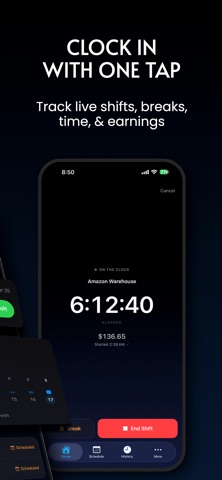
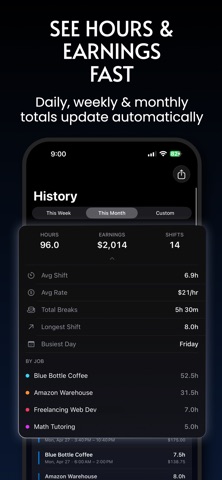
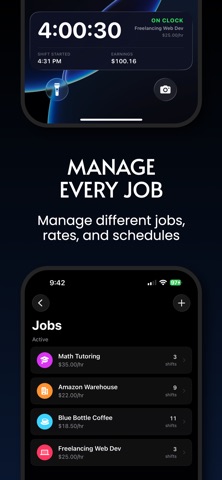
Shiftly is a simple, polished shift tracker for workers who want to track work hours, breaks, schedules, and earnings without messy spreadsheets. Clock in with one tap, track your live shift, adjust your start or end time when needed, and see your estimated pay update automatically. Whether you work hourly, juggle multiple jobs, or just want a clearer view of your week, Shiftly helps you stay on top of your time. TRACK LIVE SHIFTS Start a shift in seconds and see your elapsed time, break time, and estimated earnings while you work. Forgot to start exactly on time? Adjust your start time before saving. PLAN YOUR WORK WEEK Add upcoming shifts, view your schedule, and quickly start scheduled shifts when it’s time to work. SEE HOURS AND EARNINGS View daily and weekly totals, recent shifts, upcoming shifts, and shifts that need attention from your Home screen. MANAGE BREAKS Track unpaid breaks during live shifts or adjust break time before saving your entry. TRACK MULTIPLE JOBS Create jobs with different names, hourly rates, colors, and currencies. Perfect for workers with more than one workplace, role, or side job. EXPORT TIMESHEETS Export your shift history as PDF, CSV, or spreadsheet-friendly files for records, payroll, invoices, or personal tracking. BUILT FOR REAL WORKFLOWS Shiftly lets you edit saved shifts, confirm scheduled shifts, skip missed shifts, and keep your records accurate even when your day does not go exactly as planned. Shiftly Pro unlocks unlimited jobs, recurring schedules, overtime rules, and export options. Shiftly is made for hourly workers, freelancers, part-time workers, students, contractors, service workers, warehouse workers, baristas, retail workers, cleaners, tutors, healthcare workers, and anyone who needs a clean way to track work hours and pay. Simple shift tracking. Clear earnings. Better records. Terms of Use: https://nistic.net/shiftly/terms Privacy Policy: https://nistic.net/shiftly/privacy
Latest release
What’s New
In this update to Hours Tracker – Shiftly, we’ve included bug fixes, along with performance and visual improvements.
Audience growth
Ratings growth
Baseline captured. Growth appears after the crawler observes a changed rating count.
Momentum comes from crawler snapshots for the tracked storefront. “Viral growth signal” means unusually fast recent rating gains; it is an indicator, not download data.
Price tracking
Price intelligence
First snapshot captured. The trend line starts after the next crawler price observation.
- First observed Aug 13, 2026 · 3:01 AM Free
Screenshots