About this app
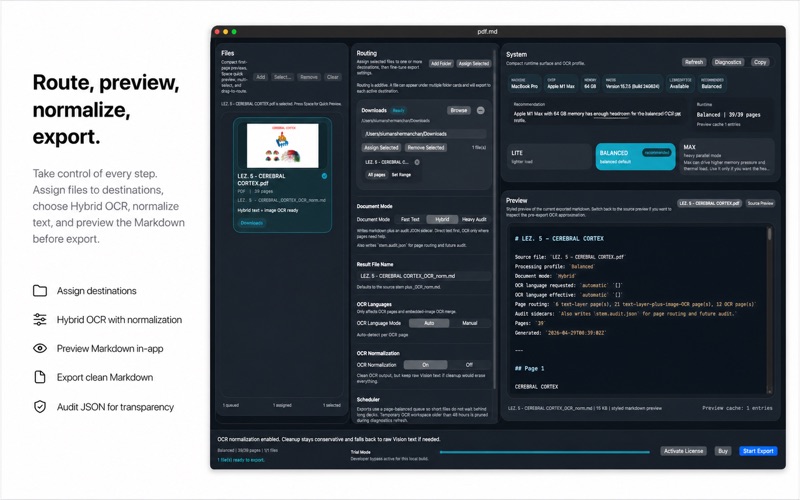
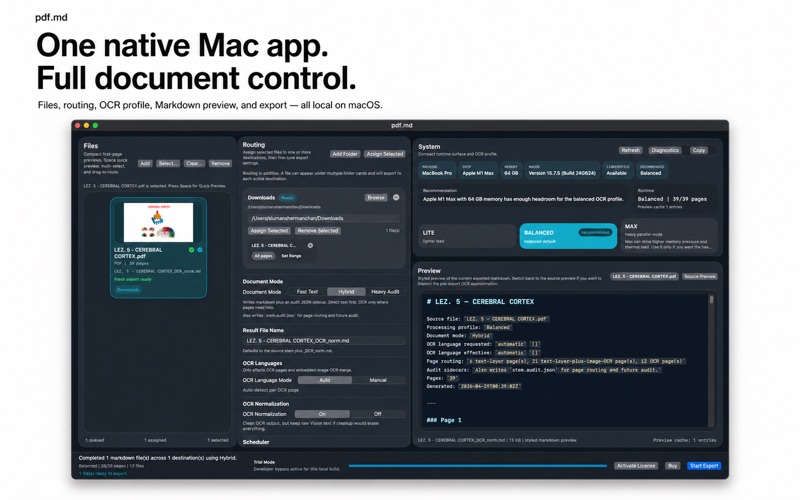
pdf.md is a native macOS app for turning difficult PDFs, slides, and images into clean Markdown. It is built for documents that ordinary converters often mishandle: lecture slides, scanned pages, image-heavy PDFs, labelled diagrams, academic notes, screenshots, and mixed files where some pages contain selectable text while others need OCR. Import your files, preview them inside the app, route them to one or more destination folders, choose an extraction mode, review the Markdown, and export to .md. The workflow stays local on your Mac and is designed for users who want control before, during, and after conversion. pdf.md supports three document modes. Fast Text extracts direct text where available. Hybrid uses direct text first and OCR only where needed. Heavy Audit is for difficult files and can produce extra audit output so you can inspect how the conversion was handled. The app includes file routing, destination assignment, page or slide range control, source preview, Markdown preview, OCR language options, OCR normalization, and system-aware OCR profile selection. It is designed as a practical workspace, not a black-box converter. For technical and academic documents, pdf.md can normalize OCR-damaged notation toward cleaner Markdown and LaTeX-style text. This helps reduce the manual repair work often needed after OCR, especially when working with scientific notes, equations, symbols, headings, lists, and image-derived text. Processing is local-first. Your selected files are handled on your Mac, and exported Markdown is written to destinations you choose. No account is required for the core workflow. Supported input includes PDF files, common image formats, and presentation files. Some presentation fallback workflows may use LibreOffice when available. pdf.md is made for students, researchers, writers, developers, and anyone who needs editable Markdown from documents that are too messy for simple copy and paste.
Latest release
What’s New
Better OCR accuracy.
Audience growth
Ratings growth
Baseline captured. Growth appears after the crawler observes a changed rating count.
Momentum comes from crawler snapshots for the tracked storefront. “Viral growth signal” means unusually fast recent rating gains; it is an indicator, not download data.
Price tracking
Price intelligence
First snapshot captured. The trend line starts after the next crawler price observation.
- First observed Aug 8, 2026 · 11:52 PM $14.99
Screenshots