About this app
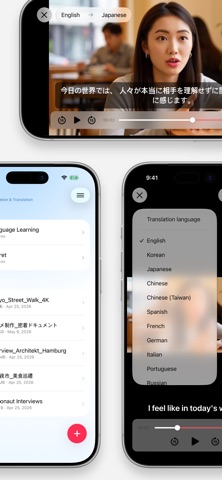
Stop searching for subtitle files. ARI Player turns speech in your videos into live subtitles and translates them into the language you choose. Enjoy foreign-language videos even when no captions are included. ◆ Live transcription and translation Speech is transcribed directly in the player and translated as the video plays. Original-language subtitles appear first while the translation is being prepared, so playback can begin without waiting. ◆ Support for 20 languages Create and translate subtitles in 20 languages, including English, Japanese, Chinese, Spanish, Korean, and French. - Change the source and translation languages for each video - High-quality translation is prioritized on supported devices - Show original and translated subtitles together ◆ Subtitles that fit your screen Adjust subtitle size and position for comfortable viewing without covering important parts of the video. ◆ Full-video translation and subtitle cache — Pro Enable subtitle caching to save translation progress automatically. Reopen the same video to see saved subtitles immediately and resume from where it left off. Pro removes the per-video limit and translates the full video. ◆ SRT subtitle downloads — Pro Download fully translated subtitles as standard SRT (.srt) files and use them in other video players or editing apps. ◆ Your videos stay on your device ARI Player does not upload your video files to a server or the cloud. Once the required language models are ready, speech recognition and translation are processed on your device. ◆ Made for iPhone, iPad, and Mac Restore purchases with the same Apple Account to keep using Pro benefits on supported devices. - iPhone with iOS 26.4 or later - iPad with iPadOS 26.4 or later - Mac with macOS 26.4 or later - Play formats supported by Apple platforms, including MP4 and MOV with H.264, HEVC, ProRes, and AV1 where available Understand foreign-language videos, lectures, and interviews more easily with ARI Player. Some language models may need to be downloaded before first use. Feature availability varies by device and language combination. Terms of Use: https://www.apple.com/legal/internet-services/itunes/dev/stdeula/
Latest release
What’s New
- Stability and usability improvements
Audience growth
Ratings growth
Baseline captured. Growth appears after the crawler observes a changed rating count.
Momentum comes from crawler snapshots for the tracked storefront. “Viral growth signal” means unusually fast recent rating gains; it is an indicator, not download data.
Price tracking
Price intelligence
First snapshot captured. The trend line starts after the next crawler price observation.
- First observed Aug 17, 2026 · 8:35 PM Free
Screenshots