About this app
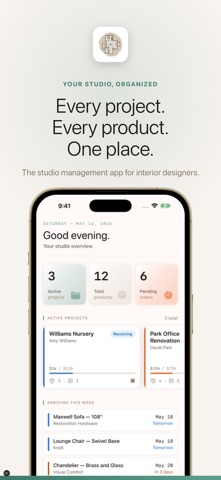
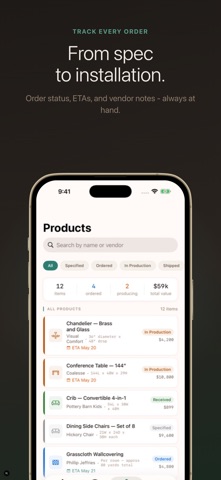
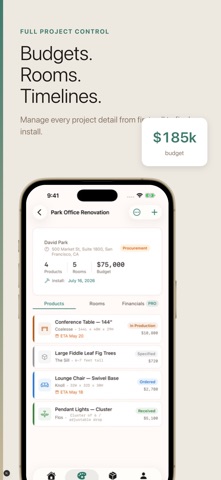
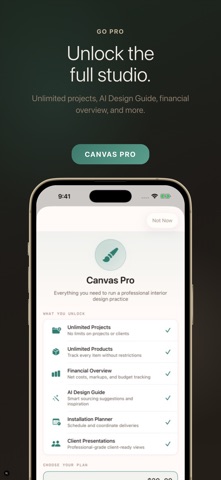
Canvas is the project management studio built for interior designers. Track every project, product, vendor, and dollar - from first client call to final installation. PROJECTS Manage every active project in one place. Track status (specification, procurement, receiving, installation, complete), set budgets, record client contact info, assign rooms, and add detailed notes. The Home dashboard gives you an instant studio overview - active projects, pending orders, and arriving deliveries at a glance. PROCUREMENT TRACKER Every product has its place. Specify FF&E with full detail: vendor, SKU, dimensions, finish, COM info, net cost, client price, lead time, order date, and ETA. Track order status from Specified through Ordered, In Production, Shipped, Received, Delivered, Installed, or Returned. Color-coded status badges make it easy to spot what needs attention. VENDOR DIRECTORY Build your trade contact book. Store rep names, phone numbers, emails, account numbers, payment terms, and working notes for every vendor relationship. PRODUCTS VIEW See all products across every project in one unified list. Filter by status, search by name or vendor, and review a summary dashboard with total item count, ordered count, in-production count, and total value. HOME DASHBOARD Good morning. Your studio overview shows active project count, total product count, pending orders, a scrollable horizontal project card strip, and an "Arriving This Week" section for products with ETAs in the next 7 days. CANVAS PRO Unlock the full studio suite with a Canvas Pro subscription: - Unlimited active projects - Unlimited product specifications - Financial overview with markup and cash flow - Budget breakdown by room - Installation planning checklists - Client presentation export - AI Design Guide (Grok-powered) Canvas is designed for professional interior designers who need a focused, beautiful tool that respects their workflow. No clutter. No spreadsheet chaos. Just your studio, organized. Terms of Use (EULA): https://www.apple.com/legal/internet-services/itunes/dev/stdeula/
Audience growth
Ratings growth
Baseline captured. Growth appears after the crawler observes a changed rating count.
Momentum comes from crawler snapshots for the tracked storefront. “Viral growth signal” means unusually fast recent rating gains; it is an indicator, not download data.
Price tracking
Price intelligence
First snapshot captured. The trend line starts after the next crawler price observation.
- First observed Sep 14, 2026 · 6:26 PM Free
Screenshots