About this app
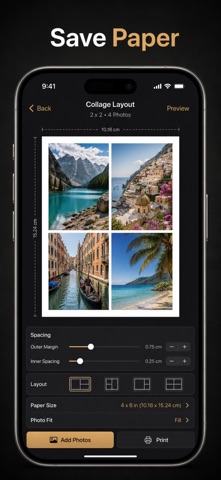
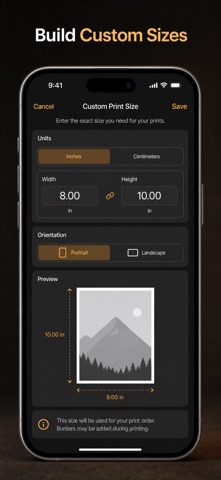
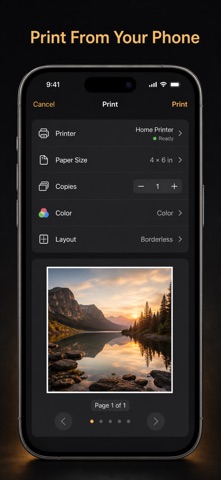
Print any photo at its exact physical size — no more guessing, cropping, or wasted paper. Photo Printer sends your pictures to any AirPrint printer at true 4×6, 5×7, 8×10, wallet, passport, or A4 dimensions, or exports a print-ready PDF you can take to any print shop. Most photo apps print "to fit the page" and quietly resize your image. Photo Printer does the opposite: it locks every print to real-world inches or centimeters so a 2×2 passport photo comes out exactly 2×2 and a wallet print is exactly wallet-sized. What you measure is what you get. WHAT YOU GET - Prints at exact physical size in inches or centimeters — 4×6, 5×7, 8×10, square, wallet, Polaroid-style, passport 2×2, A4, Letter, Legal, A5, or any custom size you type in - Multi-photo collage sheets and grids that fit several pictures on one page with adjustable spacing and margins - Fit, fill, or stretch each photo, plus rotate, zoom, and pan to frame it perfectly inside its cell - Clean borders and a background color of your choice for framed-print and scrapbook looks - Print straight to any AirPrint printer, or export a sharp PDF at 150, 300, or 600 DPI to email or take to a print shop - Live on-screen preview at the paper's true aspect ratio with a page stepper for multi-sheet jobs PERFECT FOR - Parents printing passport and ID photos at the exact required 2×2 size at home - Anyone ordering wallet, 4×6, or 5×7 prints without paying per-photo studio fees - Crafters and scrapbookers laying out collage sheets and Polaroid-style grids - Students and remote workers who need photos and documents printed at precise A4 or Letter dimensions WHY NOT JUST USE THE PHOTOS APP? The built-in share sheet scales your picture to whatever the printer decides — you can't force a true 4×6 or a legal passport size. Photo Printer measures in inches and centimeters and keeps every print dimensionally exact, so your photos come out right the first time. PRIVACY Your photos stay on your device. Nothing is uploaded, and there are no accounts, ads, or trackers. FULL ACCESS Photo Printer is free to import photos, print single photos at any paper size, add borders, and export PDFs. Unlocking Pro adds every multi-photo collage and passport grid layout, unlimited photos and pages per job, and custom background colors: - Weekly plan - Yearly plan (with free trial) - Lifetime — one-time purchase, unlocks everything forever Payment is charged to your Apple ID. Subscriptions renew automatically unless canceled at least 24 hours before the period ends; manage or cancel anytime in your App Store settings. Any unused trial time is forfeited when you purchase. Import a photo, pick a size, and print it exactly — today. Terms of Use (EULA): https://web-levi.web.app/terms Privacy Policy: https://web-levi.web.app/privacy-policy Questions? tphuc.work@gmail.com
Latest release
What’s New
Bug fixes and performance improvements.
Audience growth
Ratings growth
Baseline captured. Growth appears after the crawler observes a changed rating count.
Momentum comes from crawler snapshots for the tracked storefront. “Viral growth signal” means unusually fast recent rating gains; it is an indicator, not download data.
Price tracking
Price intelligence
First snapshot captured. The trend line starts after the next crawler price observation.
- First observed Aug 24, 2026 · 5:35 PM Free
Screenshots