About this app
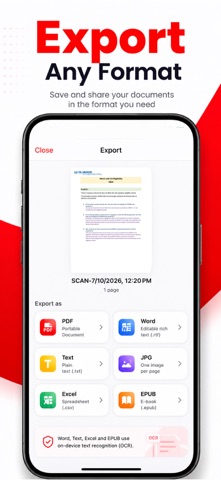
PDF Scanner Pro: Document Scan transforms your iPhone and iPad into a fast, powerful document scanner. Capture documents, receipts, notes, forms, business cards, books, whiteboards, and more in seconds. Create high-quality PDF files, extract text with OCR, sign documents, and share them instantly. SCAN ANYTHING, ANYWHERE Use your camera to scan paper documents with automatic edge detection, smart cropping, perspective correction, and image enhancement for clean, professional-quality results every time. KEY FEATURES Smart Document Scanner Auto-detect document edges Smart crop and perspective correction Scan single or multiple pages Create high-quality PDF files instantly Photo to PDF Convert photos into PDF documents Merge, reorder, rotate, and organize pages Import images from your photo library OCR Text Recognition Extract editable text from scanned documents Copy, search, and share recognized text Supports multiple languages Sign & Annotate Add signatures to documents Insert notes and annotations Fill out forms with ease Edit & Enhance Enhance scan quality automatically Apply color, grayscale, black & white, or original filters Adjust brightness, contrast, and rotation Organize Documents Create folders Rename files Search documents instantly Keep everything organized Export & Share Export as PDF or image Share via email, messaging apps, or cloud storage Print documents directly from your device Private & Secure Protect important documents Keep your files organized and accessible Your documents remain under your control PERFECT FOR Students — Scan notes, assignments, books, and study materials Professionals — Digitize receipts, invoices, contracts, reports, and forms Home — Organize bills, warranties, manuals, letters, and important paperwork Office — Capture meeting notes and whiteboards Everyday Use — Convert paper documents into searchable PDFs WHY CHOOSE PDF SCANNER & DOCUMENT SCAN? Fast document scanning High-quality PDF creation Accurate OCR text recognition Easy document editing Simple and intuitive interface Works offline for scanning Secure document management Download PDF Scanner & Document Scan today and scan, convert, edit, sign, organize, and share your documents—all from one powerful app. SUBSCRIPTION Unlock unlimited scanning, OCR, document editing, and all premium features with a subscription. Weekly — $3.99 (includes free trial) Monthly — $14.99 Yearly — $39.99 (Best Value) FREE TRIAL & BILLING Payment is charged to your Apple ID at confirmation of purchase. Subscriptions renew automatically unless canceled at least 24 hours before the end of the current billing period. Your account will be charged for renewal within 24 hours before the current subscription expires. You can manage or cancel your subscription anytime in Settings > Apple ID > Subscriptions. Any unused portion of a free trial will be forfeited after purchasing a subscription. Privacy Policy: https://mduzzalmiadev.github.io/app-legal/pdf-scanner/privacy.html Terms of Use: https://mduzzalmiadev.github.io/app-legal/pdf-scanner/terms.html
Latest release
What’s New
Bug fixes and improvements.
Audience growth
Ratings growth
Baseline captured. Growth appears after the crawler observes a changed rating count.
Momentum comes from crawler snapshots for the tracked storefront. “Viral growth signal” means unusually fast recent rating gains; it is an indicator, not download data.
Price tracking
Price intelligence
First snapshot captured. The trend line starts after the next crawler price observation.
- First observed Aug 14, 2026 · 12:30 AM Free
Screenshots