About this app
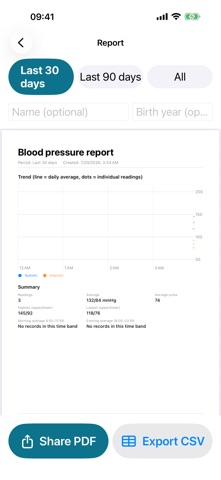
CuffNotes is a paper-simple blood pressure logbook for your parents — or for you. Take a reading with your home cuff, then copy the two numbers in. That's it. Built for seniors, and for adult children logging on their behalf: LARGE PRINT BY DEFAULT No settings to hunt for. Entry digits are 72pt and buttons are big and easy to tap, right out of the box. THREE STEPS PER ENTRY Upper → lower → save, on a custom big-key pad that auto-advances. Pulse, time, tag and note are all optional. A full-screen confirmation tells you it saved. TRENDS AT A GLANCE Two clean lines over color bands based on number ranges. The bands and colors simply sort your records so they are easier to look back on — they are for reference only, not a diagnosis and not medical advice. ONE-TAP REPORT Generate an A4 PDF with the trend chart, a summary and a full readings table, then share it with your doctor or family. CSV export is included. No watermark, no export limits. APPLE HEALTH SYNC Optionally write entries to the Health app, and import blood pressure that other apps or devices saved there. DAILY REMINDERS A gentle nudge at the times you choose, up to three a day, with your own wording. EVERY FEATURE IS FREE Logging, trends, reports, PDF/CSV export, Health sync and reminders are all free, forever. Nothing is locked and there is no subscription. There is one banner ad at the bottom of the app; a single optional purchase removes it. Buying it does not add or remove any feature. Privacy: your blood pressure records stay on this device (plus the Health app if you turn that on). They are never uploaded and are never used for advertising. Logging, trends, reports and export all work offline; only the bottom banner needs a connection. This app does not track you and never shows the "Allow tracking" prompt. Important: CuffNotes is a manual logbook. It does not take, estimate or interpret blood pressure readings, and it is not a substitute for a doctor. If you feel unwell or have questions, please seek medical care.
Audience growth
Ratings growth
Baseline captured. Growth appears after the crawler observes a changed rating count.
Momentum comes from crawler snapshots for the tracked storefront. “Viral growth signal” means unusually fast recent rating gains; it is an indicator, not download data.
Price tracking
Price intelligence
First snapshot captured. The trend line starts after the next crawler price observation.
- First observed Aug 11, 2026 · 7:44 PM Free
Screenshots