About this app
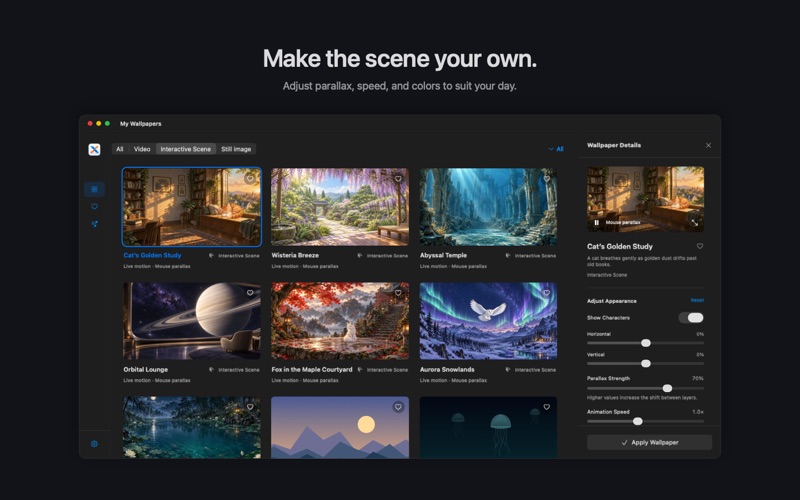
A favorite view, every time you open your Mac. Wallnook brings still images, looping videos, and interactive scenes to your desktop. From quiet landscapes to imaginative worlds, find a backdrop that suits your day and make your workspace feel like your own. BRING YOUR DESKTOP TO LIFE Play a video wallpaper or explore an interactive scene with layers that respond to your pointer. Adjust parallax strength, animation speed, and scene colors to find the look you enjoy. BUILD YOUR OWN WALLPAPER PLAYLISTS Create multiple playlists, drag wallpapers into order, and choose sequential or random rotation. Switch every 15 minutes, 30 minutes, one hour, or 24 hours. Pause rotation or skip to the next wallpaper whenever you like. A DIFFERENT VIEW ON EVERY DISPLAY Choose a wallpaper or playlist for each connected display. Rotation runs independently on each screen, with clear controls for the display you are managing. FIND YOUR FAVORITES Browse by type and category, search by name, and save the wallpapers you love. Use category and favorites filters when adding wallpapers to a playlist. MAKE IT PERSONAL Import JPEG and PNG images, or compatible MP4 and MOV videos, through the file picker or drag and drop. Wallnook copies imported files into its library and leaves your originals in place. Online wallpapers download on demand and can be used locally once downloaded. EVERYDAY CONTROLS, CLOSE AT HAND Open the library, pause or resume playback, and advance your playlists from the menu bar. Choose a light or dark appearance, pause on battery power, and use Reduce Motion when you prefer a still desktop.
Audience growth
Ratings growth
Baseline captured. Growth appears after the crawler observes a changed rating count.
Momentum comes from crawler snapshots for the tracked storefront. “Viral growth signal” means unusually fast recent rating gains; it is an indicator, not download data.
Price tracking
Price intelligence
First snapshot captured. The trend line starts after the next crawler price observation.
- First observed Oct 5, 2026 · 4:40 AM Free
Screenshots