About this app
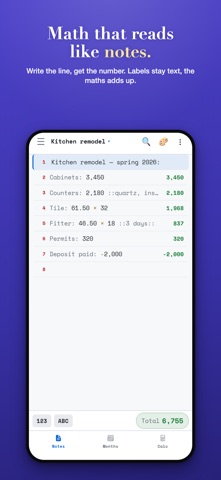
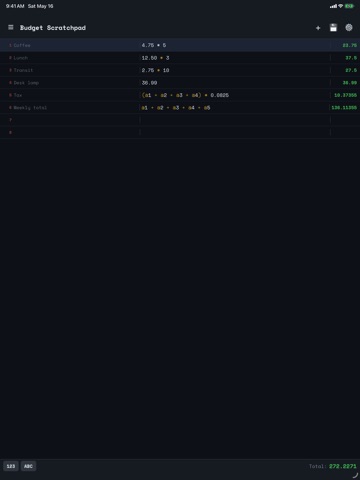
Easy Note Calc is a notepad you can do maths in. Write a line the way you'd write it on paper — "Rent: 1,200" or "Tile: 61.50 × 32" — and the answer appears beside it. Nothing to set up, no cells, no formula bar. Write it like a note Put a label before a colon and it stays plain text. "Kitchen remodel — spring 2026:" is a heading, not a sum. Anything after the colon is the maths. Wrap an aside in double colons — ::quartz, installed:: — and it's a comment the calculator ignores. Your notes read like notes, and still add up. Point at other lines with @ • @1 — the result of line 1 • @rent — every line containing that word, added together • @s2 — the total of another saved note, pulled into this one Change one number and everything pointing at it follows. Use @rent for a running subtotal and it updates as you add lines, without you touching it. Months, filled in automatically Every line with a number lands in the Months tab, grouped by the month you wrote it. See a month's total and how it compares with the month before. Switch to "By name" and every repeated word becomes its own running total for the year — tap one for a 12-month chart. There is nothing to categorise or tag. If you type "Rent" every month, Rent starts tracking itself. A real calculator too A full keypad with a running tape, kept and grouped by day, so yesterday's sums are still there tomorrow. Tap any past result to carry on from it. The same @ references work here — pull in a line, or a whole saved note's total, then send the answer back into your note. Everything else • Multiple notes, each saved as you type • Scientific functions — sin, cos, tan, log, ln, sqrt, factorial, π and e • 10 themes, five dark and five light • Search across every note • Share or export as text or as an image • Undo and redo • A tap-friendly keypad, or just use your keyboard Your notes stay on your device No account. No sign-up. Works completely offline. Everything you write is stored on your phone and is never uploaded anywhere. Easy Note Calc is free, supported by ads. Good for budgets, quotes and invoices, shopping totals, homework, unit conversions, job costing, splitting bills, or any time you want a scratch pad that does the adding for you.
Latest release
What’s New
Version 2.0 is the biggest update since launch. Months — every line with a number is now totalled by the month you wrote it, with a comparison against the month before. Switch to "By name" and every repeated word becomes its own total for the year, with a 12-month chart. Nothing to set up or categorise. Calculator — a full keypad with a history that's kept and grouped by day, so yesterday's calculations are still there. Tap any result to carry on from it. References — @1 points at a line, @rent adds up every line containing that word, and @s2 pulls in another saved note's total. Change one number and everything pointing at it follows. A clearer way to write — put a label before a colon and it stays plain text; put an aside in ::double colons:: and it doesn't compute. Plus faster editing in long notes, and important fixes to how notes written in earlier versions are read.
Audience growth
Ratings growth
Baseline captured. Growth appears after the crawler observes a changed rating count.
Momentum comes from crawler snapshots for the tracked storefront. “Viral growth signal” means unusually fast recent rating gains; it is an indicator, not download data.
Price tracking
Price intelligence
First snapshot captured. The trend line starts after the next crawler price observation.
- First observed Aug 18, 2026 · 11:35 PM Free
Screenshots