About this app
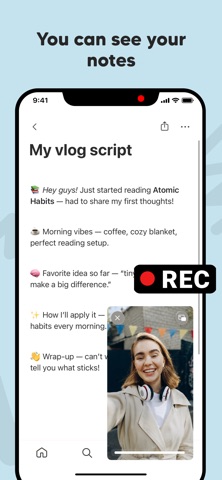
Float Cam - Background camera is a smart floating camera app that lets you record videos and take pictures while using your phone. Unlike the standard system camera, Float Cam allows multitasking — you can keep a floating camera window on screen while reading notes, browsing the web, or checking your script within the app. MAIN FEATURES: • Floating camera window: Move, resize, and position the floating camera anywhere on your screen. • Background camera recording: Record videos while keeping other content visible. • See your notes while recording: Ideal for creators, vloggers, students, or anyone reading a script. • Built-in web browser: Open any website while recording yourself. • Open images, PDFs, or documents: Display reference materials, lyrics, or presentations during video recording. • Switch front or back camera: Use either the selfie camera or rear camera easily. • Capture photos anytime: Take photos directly from the floating camera bubble. • Simple, intuitive, and powerful UI. - PERFECT FOR: • Content creators, vloggers, and YouTubers who want to record themselves while reading notes or a teleprompter. • Musicians and singers who want to see lyrics or chords while recording video performances. • Students and teachers who record study videos, tutorials, or online lessons while referencing their materials. • Coaches, trainers, and speakers who want to see their key points while recording motivational or training videos. • Business users who record video messages, product demos, or presentations with reference documents visible. - WHY FLOAT CAM? Traditional cameras block your screen while recording. Float Cam - Background camera gives you freedom. The floating camera view stays on top, so you can record video and use your phone at the same time. With the in-app browser, document viewer, and notes editor, you can open: • Websites, YouTube, or Google Docs • Images, PDFs, or DOCX files • Personal notes or scripts Float Cam is not just a camera — it's a complete multitasking video recording tool. Whether you're filming a tutorial, singing your favorite song, presenting your project, or rehearsing a speech, Float Cam helps you stay focused and efficient. - More reasons to love Float Cam Float Cam combines everything you need in one floating camera app — a picture-in-picture camera, background video recorder, and teleprompter-style note viewer. Whether you want to record video while using other apps, take photos while multitasking, or overlay a floating selfie camera while browsing, Float Cam does it all. It's perfect as a floating camera for YouTube, musicians, teachers, and vloggers who want a camera with notes, lyrics, or PDF viewer always visible on screen. - Download Float Cam - Background camera now and experience the freedom of recording videos while multitasking. Stay creative, productive, and focused — all in one floating camera app. By using this app, you agree to Apple's standard End User License Agreement (EULA), available here: https://www.apple.com/legal/internet-services/itunes/dev/stdeula/
Latest release
What’s New
Improve stability of the app
Audience growth
Ratings growth
Baseline captured. Growth appears after the crawler observes a changed rating count.
Momentum comes from crawler snapshots for the tracked storefront. “Viral growth signal” means unusually fast recent rating gains; it is an indicator, not download data.
Price tracking
Price intelligence
First snapshot captured. The trend line starts after the next crawler price observation.
- First observed Aug 18, 2026 · 3:15 PM Free
Screenshots