About this app
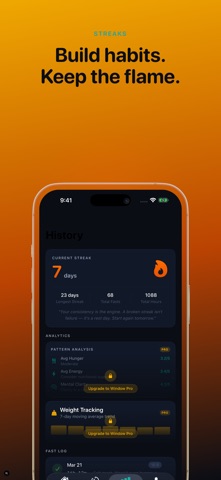
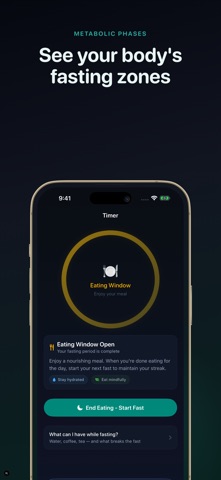
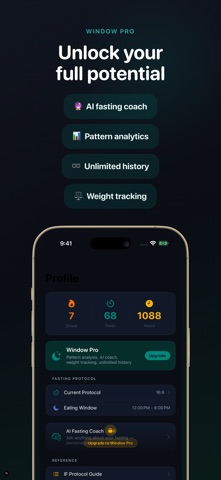
Window is the intermittent fasting timer built for people who take their health seriously. A clean circular ring tracks every hour of your fast - no clutter, just calm focus. START FASTING IN SECONDS Tap once to start. Your fast timer begins, your metabolic state updates in real time, and your streak grows with every completed fast. 16:8, 18:6, 20:4, OMAD - Window supports every protocol. KNOW YOUR METABOLIC STATE Watch your body shift through distinct phases: Fed, Ketosis, Fat Burn, and Autophagy. See exactly where you are and what is happening inside your body at each stage. TRACK YOUR STREAK A daily streak keeps you consistent. See your current streak, longest streak, total fasts, and total fasting hours - all updated automatically. YOUR EATING WINDOW, CLEARLY MARKED When your fast ends, Window opens your eating window. An amber indicator shows exactly when to eat and when to stop. Start your next fast when the window closes. LOG HOW YOU FEEL Record hunger, energy, and mental clarity during each fast. Over time, see your personal patterns in the Pattern Analysis section. WINDOW PRO - GO DEEPER - Pattern Analysis: understand your hunger, energy, and clarity trends across all your fasts - Weight Tracking: log your weight after each eating window, see a 7-day moving average - AI Fasting Coach: ask anything about fasting - protocols, science, troubleshooting - Full history: all your fasts, no 30-day limit WHAT MAKES WINDOW DIFFERENT Clean. No ads. No gamification. No noise. Just your fast, your ring, and your streak. The design is built around the timer - because the timer is the product. FASTING SCIENCE BUILT IN - Metabolic state timeline: Fed, Ketosis, Fat Burn, Autophagy - What breaks a fast: reference guide always one tap away - Protocol guide: 12:12 through ADF explained - Electrolyte and hydration reference - Beginner progression guide Terms of Use (EULA): https://www.apple.com/legal/internet-services/itunes/dev/stdeula/
Latest release
What’s New
Under-the-hood improvements. Same fasting tracker you know - thank you for using Window!
Audience growth
Ratings growth
Baseline captured. Growth appears after the crawler observes a changed rating count.
Momentum comes from crawler snapshots for the tracked storefront. “Viral growth signal” means unusually fast recent rating gains; it is an indicator, not download data.
Price tracking
Price intelligence
First snapshot captured. The trend line starts after the next crawler price observation.
- First observed Sep 21, 2026 · 5:18 AM Free
Screenshots