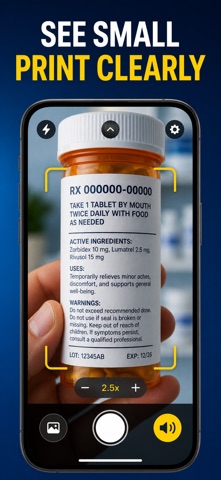
About this app
Can't read the small print? Point your iPhone at it and Magnifier makes it big, bright, and easy to see — instantly. Magnifier turns your camera into a powerful magnifying glass built for real eyes and real moments: the tiny ingredient list, the pill bottle, the restaurant menu in dim light, the fine print on a contract. Zoom in up to 10×, steady the shot, and see every letter clearly. And when your eyes are tired, Magnifier can read the words out loud. WHAT YOU GET - Zoom in up to 10× on any small text or detail with a crisp, high-resolution view - Turn on the light to brighten dark labels, menus, and packaging in a tap - Low-vision filters — invert, high-contrast, grayscale and warm tint — make faint text pop - Freeze the frame, then pinch to inspect calmly with no shaky hands or blur - Read Mode captures a label or menu and reads the text aloud, hands-free - Save any snapshot to your Library and pull it back up whenever you need it PERFECT FOR - Anyone with low vision, presbyopia, or tired eyes - Seniors reading medicine labels, bills, and letters - Diners squinting at menus in dim restaurants - Hobbyists inspecting fine detail, stamps, coins, and stitching WHY NOT JUST USE THE CAMERA APP? The camera zoom gets grainy fast, offers no contrast filters, can't freeze and hold a frame, and never reads text aloud. Magnifier is tuned for reading — steady, bright, high-contrast, and voiced when you need it. PRIVACY Everything happens on your device. Text recognition and filters run locally with Core Image and Vision — nothing is uploaded, no account, no ads, no tracking. FULL ACCESS Magnifier is free to try. A subscription or one-time purchase unlocks every color filter, unlimited saved snapshots, and Read-Mode text-to-speech: - Weekly - Yearly - Lifetime (one-time purchase) Payment is charged to your Apple ID. Subscriptions renew automatically unless canceled at least 24 hours before the period ends; manage or cancel anytime in Settings. Point, zoom, and read anything — download Magnifier and see the small things clearly. Terms of Use (EULA): https://web-levi.web.app/terms Privacy Policy: https://web-levi.web.app/privacy-policy Questions? tphuc.work@gmail.com
Latest release
What’s New
Bug fixes and performance improvements.
Audience growth
Ratings growth
Baseline captured. Growth appears after the crawler observes a changed rating count.
Momentum comes from crawler snapshots for the tracked storefront. “Viral growth signal” means unusually fast recent rating gains; it is an indicator, not download data.
Price tracking
Price intelligence
First snapshot captured. The trend line starts after the next crawler price observation.
- First observed Aug 20, 2026 · 9:24 PM Free
Screenshots