About this app
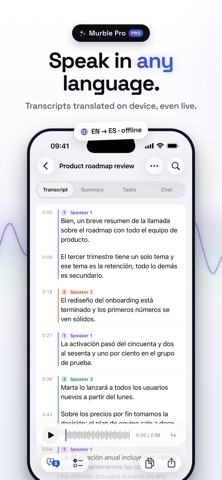
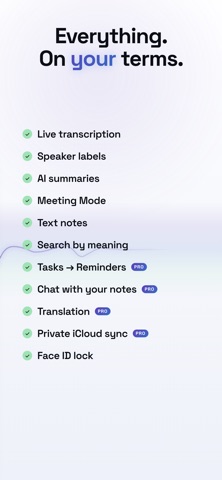
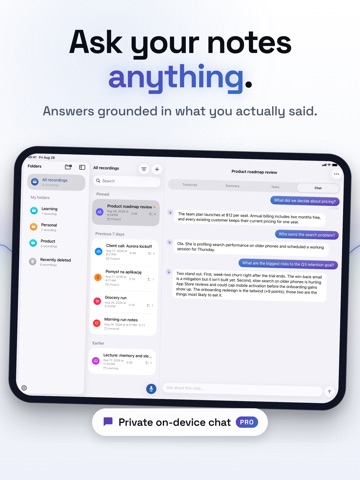
Murble turns your voice into organized notes privately on iPhone and iPad. Record a thought, a meeting or a lecture. Murble transcribes it on device, writes a clear summary and finds action items. When you return, search every part of the note, combine filters, save smart folders, mark important moments and add more audio to the same note. No account. No cloud processing. No tracking. WHAT YOU GET FREE • Unlimited recording and on-device transcription • AI summaries with key points and highlights, in the style you choose • Automatic action items you can check off • Live transcription preview while you speak • Anonymous speaker labels you can rename, merge or split • Text notes, Share Extension, Siri, Shortcuts, widgets and Control Center actions • Search that reaches summaries, action items, speaker labels and folder names • One View menu for sorting and combinable filters, plus smart folders that keep themselves current • Select several notes at once to pin, move or delete them together • Markers you drop with one tap while recording, and can add or move afterwards • Add a new take to an existing note instead of starting a second one • A Storage screen that shows what your recordings take up, and clears audio past an age you pick • Categories, import and export (PDF, Markdown, SRT and more) • Face ID lock and optional auto-delete of audio MURBLE PRO • Apple Reminders sync: send action items to Reminders, completion syncs back • Chat with your notes: ask questions, get answers grounded in the recording • Detailed multi-section reports with decisions and next steps • Translations of transcripts and summaries • Private iCloud sync across your devices: choose whether sync carries your recordings PRIVACY FIRST Transcription and AI run on your iPhone, using Apple Intelligence or a downloadable offline model. With iCloud sync on, data is stored only in your private iCloud database. We cannot read your notes. Ever. Murble Pro is available as a monthly or yearly subscription, or a one-time lifetime purchase. The yearly plan starts with a 7-day free trial. Payment is charged to your Apple account. Subscriptions renew automatically unless cancelled at least 24 hours before the end of the period. Terms of Use (EULA): https://getmurble.com/terms.html
Latest release
What’s New
YOUR LIBRARY, YOUR WAY • Sort and filter from one View menu: newest, oldest, longest, by name, and filters you can combine. • Smart folders keep themselves up to date, from the filters you already use. • Select several notes at once to pin, move or delete them together. SEARCH THAT REACHES FURTHER • Search now looks inside summaries, tasks, speaker names and folder names, and each result says where it matched. MARK THE MOMENT • One tap while recording drops a marker. It lands in the transcript, ready to jump back to, and travels into your exports. ADD TO A RECORDING • A conversation that comes back can join the note it belongs to instead of becoming a second one. Existing transcript, markers and speaker labels keep their place. CLEARER CONVERSATIONS • Speaker labels now carry into summaries, reports and chat, with cleaner handling of short noises and speaker changes. WHILE YOU WAIT • A Live Activity shows transcription and summary progress on the Lock Screen and in the Dynamic Island. ON iPAD • Drag notes onto a folder, and use keyboard shortcuts for recording, search and the detail tabs. SYNC AND STORAGE • Choose whether iCloud sync carries your recordings or only the notes, and see exactly what is taking space in the new Storage screen.
Audience growth
Ratings growth
Baseline captured. Growth appears after the crawler observes a changed rating count.
Momentum comes from crawler snapshots for the tracked storefront. “Viral growth signal” means unusually fast recent rating gains; it is an indicator, not download data.
Price tracking
Price intelligence
First snapshot captured. The trend line starts after the next crawler price observation.
- First observed Sep 3, 2026 · 12:21 AM Free
Screenshots