About this app
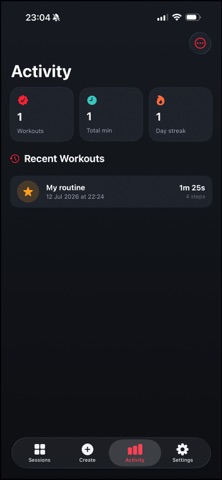
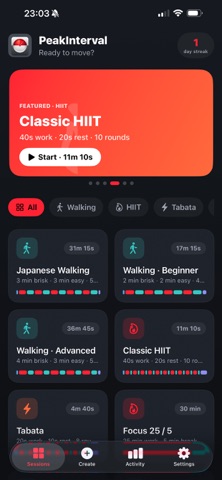
PeakInterval is a clean, focused interval timer for every kind of training — from gentle Japanese walking to all-out HIIT. Set it, start it, and just move. Clear audio, spoken zone names and haptic cues keep you on pace so you never have to look at your screen. WORKOUTS FOR EVERY GOAL - Japanese Walking — alternate brisk and easy paces (beginner, classic and advanced) - Classic HIIT — 40 seconds on, 20 seconds off - Tabata — the original 20/10 protocol - Run/Walk and Sprint Intervals - Focus 25/5 — for deep-work blocks, not just workouts - Mobility Flow — an easy moving stretch BUILD YOUR OWN Use Quick Build to generate a repeating work/rest pattern in seconds — set your work and rest zones, rounds, and optional warm-up and cool-down. Or fine-tune every interval by hand. Your custom timers are saved under My Timers, ready whenever you are. CUES THAT KEEP YOU MOVING Every zone gets its own distinct sound — rising tones for effort, falling tones for recovery, ticks for the final three seconds, and a fanfare when you finish. Zone names can be spoken aloud, and haptics buzz on every change. It all plays over your own music and respects the toggles in Settings. LIVE ACTIVITY + DYNAMIC ISLAND When a workout starts, a live banner appears on your Lock Screen and in the Dynamic Island — showing the current zone, a self-updating countdown, your progress and what's next. No need to unlock your phone mid-set. APPLE WATCH APP Start, pause, skip and stop workouts right from your wrist, with haptic cues on every zone. Browse the same built-in workouts and your custom timers, synced from your phone. TRACK YOUR PROGRESS See lifetime stats — total workouts, minutes trained and your current day streak — plus a log of every finished session. PRIVATE BY DESIGN Everything stays on your device. No account, no sign-up, no data collection, no ads. Requires iOS 17 or later. Apple Watch app requires watchOS 10 or later.
Latest release
What’s New
This update fixes the Lock Screen experience: • The Live Activity now keeps running with your phone locked — the total countdown and progress bar no longer freeze a few seconds after the screen turns off • The Lock Screen and Dynamic Island now show both your current interval time and total time remaining at a glance • Various reliability improvements
Audience growth
Ratings growth
Baseline captured. Growth appears after the crawler observes a changed rating count.
Momentum comes from crawler snapshots for the tracked storefront. “Viral growth signal” means unusually fast recent rating gains; it is an indicator, not download data.
Price tracking
Price intelligence
First snapshot captured. The trend line starts after the next crawler price observation.
- First observed Aug 12, 2026 · 11:54 PM Free
Screenshots