About this app
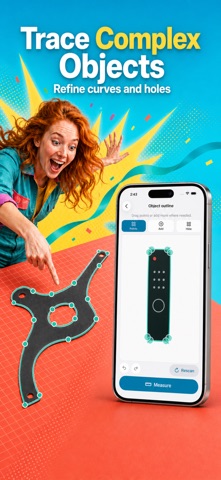
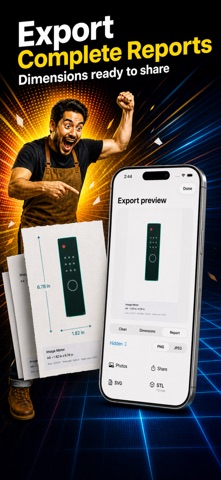
Measure flat objects from a photo using a sheet of paper as a reference. Paper Image Meter corrects camera perspective, confirms the paper boundary, traces the object, and calculates useful measurements in millimetres, centimetres, or inches. Image analysis stays on your iPhone. HOW IT WORKS 1. Take a photo or import one from Photos or Files. 2. Choose the paper format—A4 is selected by default. 3. Confirm the detected paper corners before measurement. 4. Select the object and refine its outline when needed. 5. Review width, height, area, perimeter, paper coverage, and confidence. 6. Save the result or export a polished annotated image or SVG outline. PAPER FORMATS Choose ISO A0–A6, US Letter, Legal, Tabloid, Executive, 4×6, 5×7, 8×10, or enter a custom paper size from 10 to 2000 mm. The app automatically accounts for portrait or landscape orientation after the paper corners are confirmed. CORRECT PHOTOS TAKEN AT AN ANGLE The detected paper quadrilateral is always shown for confirmation. Drag the four corner handles, use the magnified loupe for precise placement, reset the adjustment, or run detection again. The app validates the shape before converting the photographed sheet into a normalized view with a physical pixel-to-millimetre scale. REFINE COMPLEX OBJECTS Start from the automatically detected object, then refine difficult edges with contour nodes or add and erase brushes. Adjust brush size, smooth the result, undo or redo changes, and return to the automatic outline. The editor supports curved edges, holes, concave shapes, fine details, and multiple contour components that belong to the selected object. USEFUL MEASUREMENT RESULTS View rotated bounding width and height, area, perimeter, percentage of the paper covered, and a combined confidence indication. Low-confidence scenes are identified instead of being presented as certain measurements. Save projects locally, reopen them from history, and continue refining without spending another free completed measurement. EXPORT YOUR RESULT Create Clean, Dimensioned, or Report layouts with the object outline and key measurements. Choose whether the date appears on the image, in the report footer, or not at all. Preview the layout, then export an annotated PNG or JPEG, or a standalone SVG/STL outline with physical units. Share through Photos, Files, or the system share sheet. DESIGNED FOR THE RIGHT SCENE For the best estimate, place one flat object completely on one flat sheet of paper. The paper and object must be fully visible and lie on the same plane. Transparent, reflective, folded, heavily shadowed, partially off-paper, three-dimensional, or ambiguous low-contrast scenes may be blocked or shown with a low-confidence warning. Paper Image Meter performs image analysis and measurement processing on your device. It does not require an account, upload photos for processing, or include analytics or advertising SDKs. Measurements are consumer estimates and are not certified for trade, engineering, medical, safety, or other regulated use. For the best estimate, the entire paper and one flat object must be visible, flat, and on the same plane. Results may be inaccurate for folded paper, transparent or reflective objects, heavy shadows, glare, blur, low contrast, objects extending beyond the paper, or three-dimensional objects. Saved measurement projects remain in the app's local container unless you choose to export or share them. Generated exports omit location metadata. Apple may process purchase and subscription information through StoreKit under Apple's terms and privacy practices. Paper Image Meter includes five lifetime free completed measurements. After those uses, an active yearly auto-renewing subscription is required to start another new measurement. Editing, reopening, saving, or exporting an existing measurement does not consume another use. Terms: https://www.apple.com/legal/internet-services/itunes/dev/stdeula/ Privacy: https://yumcut.com/mobile/privacy
Latest release
What’s New
Updated the app’s name and App Store presentation to highlight photo-based object measurement, A4 paper, area, perimeter, and supported paper formats.
Audience growth
Ratings growth
Baseline captured. Growth appears after the crawler observes a changed rating count.
Momentum comes from crawler snapshots for the tracked storefront. “Viral growth signal” means unusually fast recent rating gains; it is an indicator, not download data.
Price tracking
Price intelligence
First snapshot captured. The trend line starts after the next crawler price observation.
- First observed Sep 2, 2026 · 7:47 AM Free
Screenshots