About this app
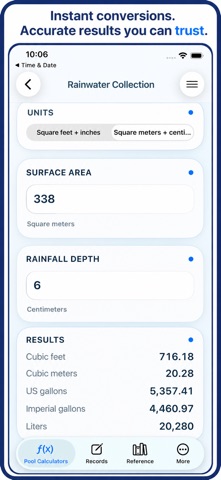
Thank you for using PoolCalcs and for taking pool care seriously. Careful pool owners and service professionals deserve a tool that respects their time. PoolCalcs keeps practical calculations and organized service history together for quicker work and better records. Calculate pool volume without hunting through formulas or repeating conversions. Enter the measurements you have, choose American or Metric units, and review clear results for everyday planning. Pool shape calculators include: - Circular pools - Rectangular pools - Elliptical and oval pools - Square pools - Free form pools - Bean shaped pools Useful conversion and water tools include: - Area and distance conversion - US, Imperial, and metric volume conversion - Flow rate conversion - Pressure conversion - Fahrenheit, Celsius, and Kelvin conversion - Rainwater collection estimates - Langelier Saturation Index estimates Build a dependable pool service log instead of relying on loose notes, old photos, or memory. Create a profile for each pool and keep its water tests, chemical treatments, maintenance work, and saved calculations attached to the correct property. Each pool profile can store: - Pool name and estimated capacity - Shape and surface type - Sanitizer and filter type - Pump type and climate region - Notes for equipment, access, or seasonal details Record water chemistry readings that matter during routine care: - Free chlorine and combined chlorine - pH and total alkalinity - Calcium hardness - Cyanuric acid - Salt level - Water temperature - Test date and notes Keep a chemical treatment history with the product name, dose, unit, reason, notes, and optional before and after readings. It becomes easier to answer practical questions such as what was added after heavy rain, how much chlorine was used last time, or whether a treatment produced the result you expected. Track maintenance work in the same pool record: - Filter cleaning and backwashing - Pressure readings before and after service - Equipment checks and part replacement notes - Opening, closing, and seasonal tasks - Cleaning and follow-up reminders The Records view is made for quick work on site: - Search saved pools by name - Sort records by name or type - Choose ascending or descending order - Review record totals at a glance - Open a pool to see its full history - Save calculator scenarios for later comparison Protect and reuse your data with Import & Export tools: - Create a restorable JSON backup - Import a compatible PoolCalcs backup - Export records as spreadsheet-ready CSV - Share an export through the standard iOS share sheet - Review what is included before moving your data The built-in reference library keeps helpful pool chemistry guidance close by. Search saved topics from sources including CDC, EPA, USGS, and PubChem, then open the original publication when you want more detail. Settings provide practical app-wide controls: - Select American or Metric units for supported calculators - Check the App Store for an available update - Clear saved calculator inputs without deleting pool records - Reach support, privacy information, and terms The free plan keeps essential calculators available and provides limited record saving. PoolCalcs Pro unlocks every pool calculator and unlimited pool profiles, water tests, treatments, maintenance entries, and saved scenarios. Monthly and lifetime purchase options are available, with restore support through the App Store. For monthly subscriptions: Monthly Pro is a 1-month auto-renewable subscription. Terms of Use (EULA): https://www.apple.com/legal/internet-services/itunes/dev/stdeula/ PoolCalcs does not replace professional testing, product directions, local codes, or qualified service. It gives careful pool owners and professionals a clear workspace for calculations and records, helping good decisions start with better information.
Latest release
What’s New
Thank you for using PoolCalcs and for putting real care into every pool you manage. You made the priorities for this release clear: cleaner calculators, stronger records, easier backups, readable help, and reliable purchase access. This update improves each area while keeping routine work quick. This release is built to make pool care easier to document and faster to review. Whether you look after one backyard pool or several client properties, your calculations, readings, treatments, maintenance history, and backups now fit together with less clutter and fewer extra steps. A cleaner Calculators experience: - Renamed the main tab to Calculators for a shorter, clearer label. - Added light rounded cards, subtle borders, and grouped spacing to the calculator list. - Removed crowded right-side arrows for cleaner cell edges. - Kept calculator names, descriptions, access status, and icons easy to scan. - Improved the layout for long names and descriptions on smaller screens. - Added search so you can reach a specific calculator faster. Pool Records now works like a real service log: - Added a Help button and moved introductory instructions into a focused, readable Records guide. - Added search by pool name plus sorting by name or type in ascending or descending order. - Added detailed pool profiles for capacity, shape, surface, sanitizer, filter, pump, climate, and notes. - Added water test logs for chlorine, pH, alkalinity, hardness, CYA, salt, temperature, date, and notes. - Added chemical treatment, maintenance, pressure, and saved calculator records inside each pool history. The PoolCalcs Pro panel is easier to manage: - Added a collapse control so the plan summary does not take over the Records screen. - Made free-plan status and remaining daily access easier to understand. - Improved upgrade messaging around unlimited records and calculators. - Removed the extra daily-limit alert and now opens the paywall directly when an upgrade is required. Import & Export is now available from More: - Create a complete JSON backup of supported pool records. - Restore data from a compatible PoolCalcs JSON backup. - Export pool data as CSV for spreadsheets and general record keeping. - Share backup and CSV files with Files, Mail, AirDrop, and other available iOS destinations. - See clear explanations of backup, restore, and export behavior before continuing. Settings has been rebuilt around useful controls: - Choose American or Metric units for the app. - Check for an available App Store update. - View the installed version and build number. - Clear saved calculator inputs without removing pool profiles. - Open support, privacy, and terms information. Help and reference improvements: - Reworked Help into shorter sections with headings and readable explanations. - Added focused Records help for search, sorting, record types, deletion, and backups. - Removed overly technical formula dumps that were difficult to read. - Simplified the Reference introduction and removed the redundant library panel. - Kept source names and links available for users who want the original material. - Added clear notice that the software is provided AS IS without warranty.
Audience growth
Ratings growth
Baseline captured. Growth appears after the crawler observes a changed rating count.
Momentum comes from crawler snapshots for the tracked storefront. “Viral growth signal” means unusually fast recent rating gains; it is an indicator, not download data.
Price tracking
Price intelligence
First snapshot captured. The trend line starts after the next crawler price observation.
- First observed Aug 19, 2026 · 10:03 AM Free
Screenshots