About this app
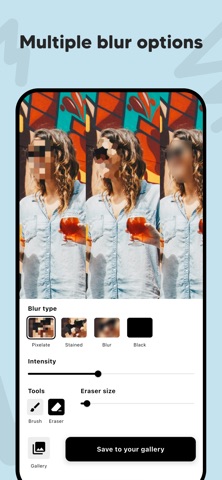
Blur faces, hide license plates, and protect your privacy — fast and easily. With Privacy Blur, you can blur any part of your photo using just your finger. Whether you're hiding faces, car plates, screens, or sensitive background details, this app gives you full control over what stays visible and what stays private. Perfect for social media posts, online selling, journalism, vlogging, or just sharing with friends — Privacy Blur helps you stay safe without compromising photo quality. - Key Features: • Blur Faces Easily - Tap and drag your finger over faces or objects to blur instantly. • Hide License Plates - Blur car numbers and vehicle plates to stay anonymous. • Multiple Blur Styles - Choose from pixelate, smooth blur, strong blur, or subtle touch. • High-Resolution Output - Your photos stay in original resolution. No compression. • Fast & Intuitive - Designed for speed and ease of use. No learning curve. • Works Offline - All editing happens on your device. Your data stays private. - Use Cases: • Blur people's faces in public photos • Hide children's faces before sharing • Blur screens or confidential documents • Mask out personal details or addresses • Censor bystanders or logos in images • Create safer posts for social media - Why Choose Privacy Blur? Unlike complex photo editors or AI tools that guess what to blur, you stay in control. Just draw over anything you want to hide — fast, direct, and secure. Whether it's a travel photo, family event, car listing, or street shot, Privacy Blur is your go-to privacy tool. - Keep your privacy in your hands. Download Privacy Blur now and make your photos safer before sharing them online. By using this app, you agree to Apple's standard End User License Agreement (EULA), available here: https://www.apple.com/legal/internet-services/itunes/dev/stdeula/
Latest release
What’s New
Improve stability of the app
Audience growth
Ratings growth
Baseline captured. Growth appears after the crawler observes a changed rating count.
Momentum comes from crawler snapshots for the tracked storefront. “Viral growth signal” means unusually fast recent rating gains; it is an indicator, not download data.
Price tracking
Price intelligence
First snapshot captured. The trend line starts after the next crawler price observation.
- First observed Aug 18, 2026 · 3:15 PM Free
Screenshots