About this app
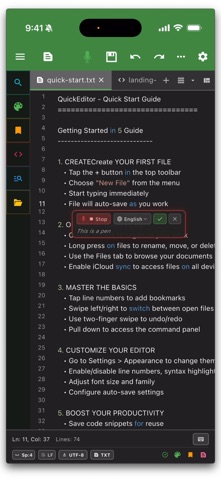
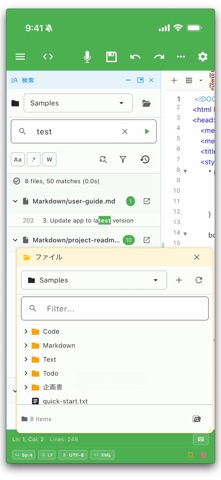
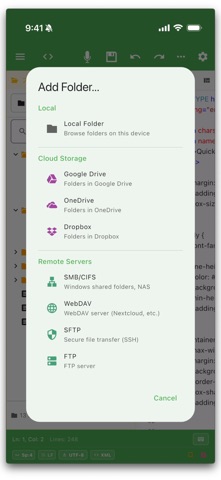
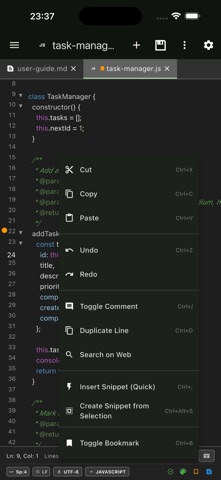
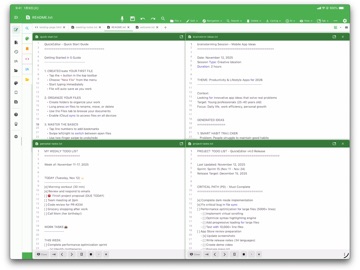
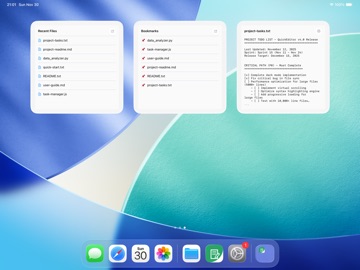
QuickEditor is a powerful, fast text and code editor designed for iOS and macOS. It seamlessly integrates your local files, cloud storage, and remote servers into one highly customizable workspace. WORKSPACE & FILE EXPLORATION: • Advanced file manager • Full-fledged organization for your local, cloud, and remote directories • Unified global search • Recursive full-text search and replace across entire folders and active tabs • Floating & dockable UI • Build your ideal layout with floating panels and dockable tool windows • Multiple workspaces • Organize complex projects efficiently with a flexible tabbed interface • Diff & Merge tools • Visually compare text files or entire folders, navigate differences, and merge changes side-by-side. CODING & TEXT CONTROL: • Syntax highlighting • Robust support for major programming languages and scripts • Command palette • Instantly access all editor commands, pin your favorites, and review command history for rapid navigation. • Speech & audio • Instantly capture ideas using voice-to-text input, and listen to documents with built-in text-to-speech (Read Aloud) features. • Code assist • Accelerate your workflow with autocomplete, reusable snippets, and global bookmarks • Rectangular selection • Edit columns of text with precision for advanced formatting • Built-in terminal • Run shell commands without leaving the editor (xterm-based) • Markdown preview • Live preview of selected text or full files • Find & replace • Powerful search with regex support across files and tabs AI AGENT & ASSISTANT: • AI Agent & MCP Server • Empower your workflow with an autonomous AI Agent that can read, write, and manage your local files via Model Context Protocol (MCP). • Persistent AI Memory • Manage long-term context and Agent Tasks seamlessly within your workspace. • AI integration • Connect with leading AI models, including local LLMs, to enhance your writing and coding productivity. REMOTE & CLOUD MANAGEMENT: • Remote direct editing • Connect and edit seamlessly on SMB/CIFS (Windows shares, Synology/QNAP NAS), SFTP/SSH, WebDAV, and FTP servers • Cloud integration • Access, manage, and sync your files anywhere via iCloud and external cloud providers • Cross-platform sync • A unified, fluid experience across your iPhone, iPad, and Mac CUSTOMIZATION & ACCESSIBILITY: • Automation & Deep links • Integrate seamlessly with Apple Shortcuts and automation tools using custom URL schemes to open specific files or workspaces. • Home screen widgets • Quick access to your most important files, recents, and bookmarks • Global encoding support • Read and write safely using 50+ encodings across 100+ languages • Theme colors • Customize with 20+ colors and dark/light mode support SUPPORTED LANGUAGES: • Python, JavaScript, Java, Kotlin • HTML, CSS, PHP, SQL • C, C++, C#, Swift • And many more... PERFECT FOR: • Programming, coding, and codebase management • Deep analysis of system logs and large text files • Quick edits to remote server configuration files • Distraction-free writing and note-taking QUICK TOOLS & WORKFLOWS: • Snippets Workspace • Reuse templates, variable sets, presets, and batch generation for repeatable text. • Bookmarks Workspace • Track code locations, inspect stale targets, and jump back to important lines. • Commands Workspace • Pin commands, customize header/footer toolbars, and audit palette visibility. • QuickSticky • Keep lightweight scratch notes beside your editor with theme colors and pinning. QuickEditor Pro unlocks: • Ad-free experience • Unlimited tabs • Advanced text operations • Priority support Terms of Use: https://kakitiro.com/quickapps/quickeditor/terms/
Latest release
What’s New
• Added Snippets Workspace for managing snippets, variable sets, presets, and batch generation. • Added Commands Workspace for pinned commands, command palette review, and toolbar customization. • Added Bookmarks Workspace for organizing bookmarks, checking stale targets, and jumping to saved locations. • Improved Quick Tools access and workspace workflows.
Audience growth
Ratings growth
Baseline captured. Growth appears after the crawler observes a changed rating count.
Momentum comes from crawler snapshots for the tracked storefront. “Viral growth signal” means unusually fast recent rating gains; it is an indicator, not download data.
Price tracking
Price intelligence
First snapshot captured. The trend line starts after the next crawler price observation.
- First observed Aug 8, 2026 · 11:28 AM Free
Screenshots