About this app
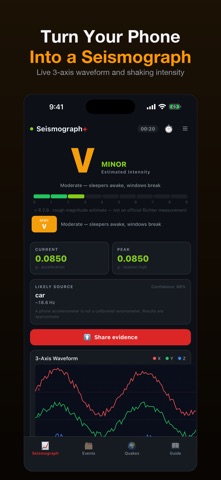
Turn your iPhone into a vibration recorder: live 3-axis waveform, automatic capture of shaking events, and a log you can replay and export. HOW IT MEASURES Shaking is read from the accelerometer and reported as peak ground acceleration, then mapped to the Modified Mercalli Intensity scale (MMI I-XII) using the USGS ShakeMap relationship. MMI is the primary scale because it is the one a phone can honestly produce — it describes how strongly a place shook. A magnitude-style number is shown alongside as a rough estimate; it is not a Richter measurement, which needs a calibrated instrument and the distance to the epicentre. AUTOMATIC CAPTURE Leave the app open and the phone resting on a solid surface. When shaking persists past the trigger threshold the app records the waveform, timestamps it, and files it in the event log with its peak acceleration and MMI level. Brief knocks and picking the phone up no longer create events. Monitoring runs while the app is open — including while you read other tabs — and holds the screen awake while the alarm is armed. iOS does not let an app like this listen in the background, so it cannot watch while the phone is locked or while you use other apps. It is a monitoring station you set down, not a background alarm. WHAT YOU GET • Live 3-axis waveform with three sensitivity presets • Event log with waveform replay • Peak acceleration and MMI for every event • On-screen alarm with vibration for stronger events, while monitoring • CSV export per event, or the whole log • Recent earthquakes feed for context PLACEMENT MATTERS Rest the phone on a table or floor. An accelerometer cannot tell ground motion from the motion of a hand carrying it — that is why real seismometers are anchored to the ground. WHO USES IT Anyone curious how much a passing train, washing machine or construction site actually shakes a building · people in seismic areas who want a record of what they felt · physics and earth-science teaching Available in 25 languages.
Latest release
What’s New
Opening a captured event now counts as reviewing it, and sharing evidence completes cleanly. Both were previously treated as nothing happening, which is also why the app only ever recognised a CSV export as finishing something. Startup was reworked too: the launch screen no longer waits on work it does not need before showing you the meter.
Audience growth
Ratings growth
Baseline captured. Growth appears after the crawler observes a changed rating count.
Momentum comes from crawler snapshots for the tracked storefront. “Viral growth signal” means unusually fast recent rating gains; it is an indicator, not download data.
Price tracking
Price intelligence
First snapshot captured. The trend line starts after the next crawler price observation.
- First observed Aug 18, 2026 · 2:58 AM Free
Screenshots