About this app
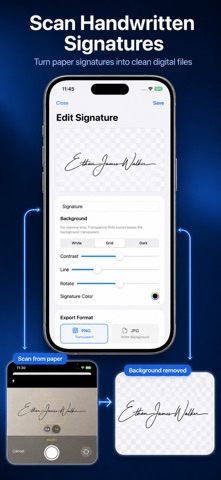
Create a clean signature image in seconds. Scan a handwritten signature from paper or draw directly on your screen. Export your signature as a transparent PNG, JPEG, or PDF file — ready to insert into any document. Key Features: • Scan handwritten signatures Use your camera to capture a signature from paper and turn it into a clean digital signature. • Draw your own signature Create a natural handwritten signature directly on your iPhone or iPad. • Transparent PNG export Export your signature with a transparent background, perfect for documents and forms. • PDF export Save your signature as a simple PDF file when you need a document-friendly format. • Edit and enhance Remove background, adjust contrast, change color, and fine-tune line thickness. • Save signature history Keep your signatures locally and reuse them anytime. • Local processing Your signatures are processed on your device. No account required. Signature Creator & Scanner is designed for quick, simple, and private signature creation. Whether you need a signature for a document, contract, or form, you can create and export one in just a few taps. Terms of Use: https://www.apple.com/legal/internet-services/itunes/dev/stdeula/
Latest release
What’s New
Bug fixes and improvements.
Audience growth
Ratings growth
Baseline captured. Growth appears after the crawler observes a changed rating count.
Momentum comes from crawler snapshots for the tracked storefront. “Viral growth signal” means unusually fast recent rating gains; it is an indicator, not download data.
Price tracking
Price intelligence
First snapshot captured. The trend line starts after the next crawler price observation.
- First observed Sep 11, 2026 · 9:56 PM Free
Screenshots