About this app
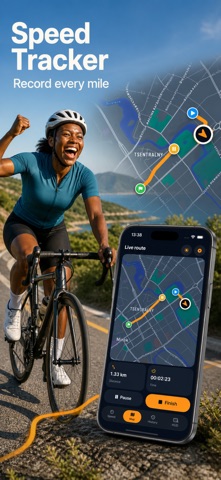
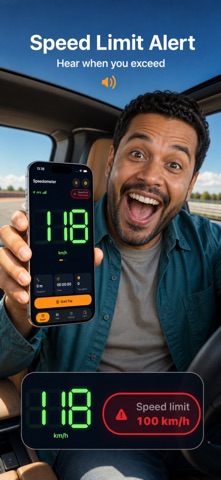
Turn your iPhone or iPad into a clear GPS speedometer and practical HUD wherever live speed matters. See the current number, unit, GPS quality, and speed-limit status in one focused light or dark view. LIVE SPEED AT A GLANCE See your current speed in mph, km/h, m/s, or knots. The production speedometer gauge and large matching number move together, so the visual needle never disagrees with the displayed value. GPS signal strength is visible when you want it, and the interface keeps the essential information prominent instead of surrounding it with distracting controls. AUDIBLE SPEED WARNING Choose a physical speed limit and enable a locally generated warning tone. The app alerts you when measured speed crosses the limit, repeats while it remains high, and re-arms after you slow down. The threshold remains physically consistent when you change units. A roadside-style dashboard badge highlights an exceedance. The tone is synthesized on your device; no microphone or remote audio service is used. RECORD COMPLETE ROUTES Speedometer GPS Plus can record a trip while you move. Follow the map and see distance, elapsed time, average speed, top speed, and detected activity. Pause and resume when needed, then finish to keep a useful summary. Each saved trip includes route geometry, recorded-point count, timing, movement statistics, and available activity context. EXPORT YOUR OWN DATA Saved routes stay portable. Export a selected trip as GPX, KML, GeoJSON, or CSV through the system file exporter. Where each format supports it, the generated file preserves timestamps, coordinates, altitude, and speed. Export is created on the device and handed to the destination you choose; the app does not upload route files to a proprietary server. WINDSHIELD HUD MODE Open the heads-up display for a simplified high-contrast speed view. Mirror it for windshield reflection and keep the same live speed value visible with minimal visual noise. HUD mode follows the selected unit and is designed for quick reading without changing how speed is measured. PRIVATE ICLOUD TRIP SYNC When iCloud sync is enabled, saved trip JSON is stored in your private iCloud Documents container so it can follow your Apple ID. If iCloud is unavailable or disabled, the app uses an on-device Documents fallback. There is no Speedometer GPS account, proprietary cloud service, advertising profile, or analytics pipeline. LOCATION AND ACTIVITY CONTEXT The app asks for When In Use location access to calculate live speed and record route points. Motion & Fitness adds walking, running, cycling, or automotive context to trips. You can change access later in system settings. Live speed and the warning remain free; Plus unlocks route recording, HUD mode, history, and iCloud route sync. Speedometer GPS is an informational travel tool. GPS readings depend on satellite visibility, device hardware, surroundings, and system conditions. Do not interact with the app while driving, and always follow posted limits, road rules, and safe operating practices. SUBSCRIPTIONS: - Speedometer GPS Plus is an auto-renewable yearly subscription. - Eligible new subscribers receive a 3-day free introductory trial. - After the trial, the subscription renews at the localized annual price shown before purchase unless auto-renew is turned off at least 24 hours before the end of the current period. - Payment will be charged to your Apple ID at confirmation of purchase. - Your subscription renews automatically unless auto-renew is turned off at least 24 hours before the end of the current period. - Your account will be charged for renewal within 24 hours before the end of the current period. - You can manage or cancel your subscription in Settings > Apple ID > Subscriptions after purchase. - Any unused portion of a free trial is forfeited when you purchase a subscription. Terms of Use: https://www.apple.com/legal/internet-services/itunes/dev/stdeula/ Privacy: https://yumcut.com/mobile/privacy
Latest release
What’s New
You can now redeem Apple-issued offer codes directly from Settings to unlock Speedometer GPS Plus. This update also improves StoreKit entitlement refresh so eligible access redeemed through the App Store is recognized when the app launches.
Audience growth
Ratings growth
Baseline captured. Growth appears after the crawler observes a changed rating count.
Momentum comes from crawler snapshots for the tracked storefront. “Viral growth signal” means unusually fast recent rating gains; it is an indicator, not download data.
Price tracking
Price intelligence
First snapshot captured. The trend line starts after the next crawler price observation.
- First observed Sep 2, 2026 · 7:47 AM Free
Screenshots