About this app
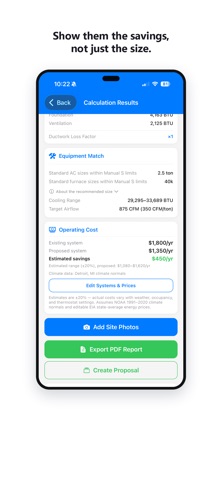
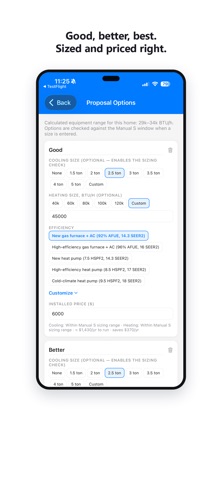
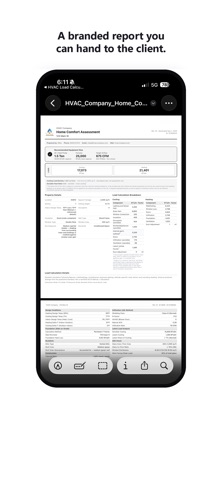
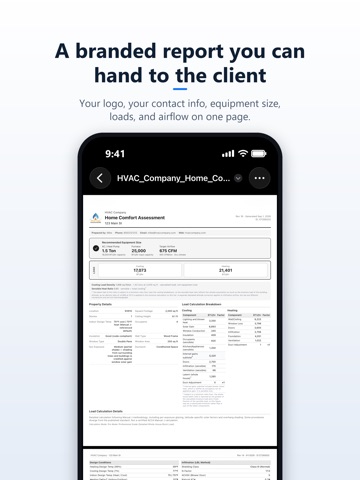
The Manual J HVAC Load Calculator is the one HVAC contractors actually want to use. Stop overpaying for clunky, over-engineered calculators designed for engineers. HVAC Load Calculator brings professional Manual J calculations to your iPhone or iPad — clean, modern, offline-ready, and built for the field. BUILT FOR HVAC PROFESSIONALS Designed from scratch for techs in the field: large buttons you can tap with gloves on, fast calculations in the basement, and professional reports that win homeowner trust. THREE LEVELS OF ACCURACY Simple Mode Sized from your ZIP code's design conditions and the home's floor area. Get an estimate in under 60 seconds with zero measurements. Perfect for quick quotes and initial sales conversations. Moderate Mode – Standard Accuracy (Whole-House Block Load) Component-level factors: insulation quality, window types, foundation. The sweet spot for standard replacement jobs. Pro Mode – Professional Grade (Detailed Whole-House Block Load) Full MJ8 detail: per-direction window solar, measured airtightness, window ratings, overhang shading, and duct analysis. Maximizes equipment life and comfort — often right-sizing by 1+ ton. Best for new construction, high-performance builds, and detailed equipment sizing. MEASURE ROOMS WITH LiDAR — NEW On LiDAR-equipped iPhone and iPad Pro models (iOS 16+), walk each room and the app measures it for you — floor area, ceiling heights, windows, and exterior walls flow straight into your load calculation. Review each room, adjust with a tap, apply. Your PDF now includes a Room Measurements chapter with a sketch of each scanned room. NOW AVAILABLE IN US AND CANADA US Mode – ZIP code lookup backed by a climate database covering nearly 28,000 ZIP codes Metric Units – Toggle between Imperial and SI (kW, m², m³/h) throughout the app and PDF reports WORKS IN THE FIELD Offline-First – No signal in the basement? No problem. Everything runs locally on your device. Auto-Save Projects – Every calculation saves automatically. Never lose your work. iCloud Sync – Start a job on your iPhone, finish it on your iPad. Projects sync automatically across your devices. Professional PDF Reports – Generate and share detailed load reports from your phone or tablet. Add client name, site address, and job number — every report is stamped with a revision number and date, so everyone knows it's the latest version. Site Photo Documentation – Capture tagged photos, label by location and component, add notes, and include a professional photo appendix in your reports. iPad & Tablet Support – Optimized layouts give you more room to work on-site or back at the office. THE MATH YOU TRUST Calculations follow ACCA Manual J 8th Edition methodology: – Cooling BTU/hr (sensible and latent loads) – Heating BTU/hr – Recommended tonnage – Recommended furnace size – Manual S-based equipment sizing guidance – Kitchen and appliance heat gain If a result looks unusual for the home's size, the app flags it before the report goes out. WHY CONTRACTORS CHOOSE US – Modern, intuitive interface that makes sense the first time you use it – Dark mode and system theme support – Fast performance, even on older devices – Privacy-first: your data stays on your device and your own private iCloud — never our servers – Free to download — try it on your first calculations before subscribing PERFECT FOR – HVAC contractors, installers, and service techs – Sales teams quoting new systems – Independent contractors building their business – Home inspectors documenting HVAC systems No account. No setup. Just open the app and get to work. Terms of Use (EULA): https://www.apple.com/legal/internet-services/itunes/dev/stdeula/
Latest release
What’s New
Finishing a Pro calculation is easier. When only the insulation R-values are left, two buttons let you fill in typical values for the insulation grade or switch to Moderate. Plus reliability fixes.
Audience growth
Ratings growth
Momentum comes from crawler snapshots for the tracked storefront. “Viral growth signal” means unusually fast recent rating gains; it is an indicator, not download data.
Price tracking
Price intelligence
- First observed Aug 11, 2026 · 7:22 AM Free
Screenshots